Boom Setup Page
Navigate to Boom Setup Page

BM011351-UN-29MAR17
Menu Button → Sprayer Application Button → Setup Menu Softkey → Boom Setup Tab
-
Select the Menu button.
-
Select the Sprayer Application button.
-
Select the Setup Menu softkey.
-
Select the Boom Setup tab.
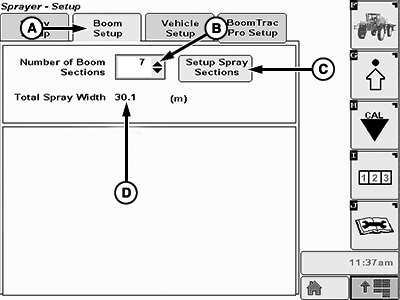
Boom Setup Page
BM011355-UN-31MAR17
Boom Setup Page
A - Boom Setup Page
B - Number of Sections Drop-down List
C - Setup Spray Sections
D - Total Spray Width
- Boom Setup Page (A): Shows the available settings regarding the spray boom.
- Number of Sections (B): Allows the operator to change the number of the spray boom sections.
- Setup Spray Sections (C): Allows the operator to individually change the number of nozzles, nozzle spacing, and nozzle spray width values for each spray boom section.
- Total Spray Width (D): Shows the total spray width based on the spray sections configuration set on Setup Spray Sections (C) and in the number of sections (B).
|
LS87647,000063E-19-20170404 |