Set Number of Nozzles, Nozzle Spacing, and Nozzle Spray Width for Broadcast Spraying

BM011351-UN-29MAR17
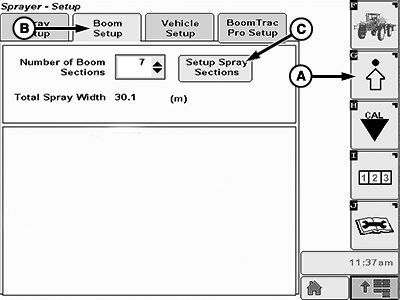
Menu Button → Sprayer Application Button → Setup Menu Softkey → Boom Setup Tab
BM011357-UN-31MAR17
Boom Setup Tab
A - Setup Menu Softkey
B - Boom Setup Tab
C - Setup Spray Sections Button
-
Select the Menu button.
-
Select the Sprayer Application button.
-
Select the Setup Menu softkey (A).
-
Select the Boom Setup tab (B).
-
Select the Setup Spray Sections button (C). The setup spray sections page appears.
-
Select the spray section to change input box (A).
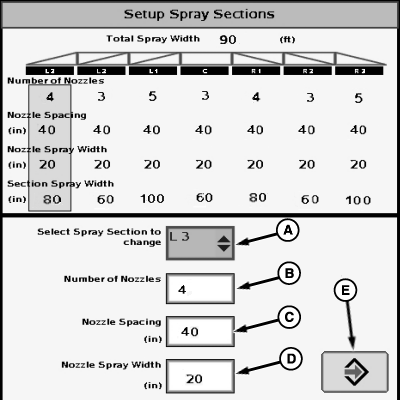
N120713-UN-09DEC15Setup Spray Sections Page
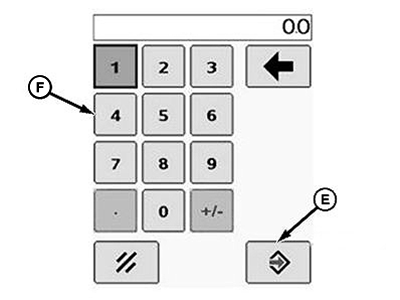
BM011358-UN-31MAR17Popup Keypad
A - Spray Section to Change Input Box
B - Number of Nozzles Input Box
C - Nozzle Spacing Input Box
D - Nozzle Spray Width Input Box
E - Accept Button
F - Popup Keypad
-
Select the spray boom section to be set in the drop-down list.
-
Select each input box (B), (C), or (D) to be changed.
-
Enter a new value using the popup keypad (F).
-
Select the Accept button (E) to accept the new value.
-
Repeat the procedure for each spray boom section.
NOTE: The section spray width and total spray width are automatically calculated according to the new settings.
NOTE: In broadcast spraying only, nozzle spray width is equal to nozzle spacing. Refer to back side of the nozzle tip calculator to determine the effective tip spray width.
|
LS87647,000063F-19-20170404 |