Vehicle Setup Page
Navigate to Vehicle Setup Page

BM011351-UN-29MAR17
Menu Button → Sprayer Application Button → Setup Menu Softkey → Vehicle Setup Tab
-
Select the Menu button.
-
Select the Sprayer Application button.
-
Select the Setup Menu softkey.
-
Select the Vehicle Setup tab.
Vehicle Setup Page
BM011359-UN-31MAR17
Vehicle Setup Page
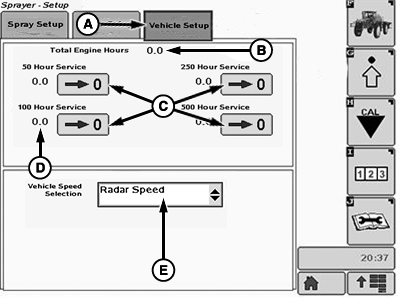
A - Vehicle Setup Page
B - Total Engine Hours (hour meter)
C - Reset Button
D - Hour Meter
E - Vehicle Speed Selection
- Vehicle Setup Page (A): Shows the total engine hours and specific hour meters for each service interval.
- Total Engine Hours (B): Shows the total engine hours of the sprayer regardless the power loss of the display or the display replacement.
- Reset Button (C): Allows the operator to reset the specific hour meter (D) for each of the listed service intervals.
- Hour Meter (D): Shows the engine hours since the last time the reset button (C) was selected.
- Vehicle Speed Selection (E): Allows the operator to change the speed input method that is shown in the Sprayer Main Page.
|
LS87647,0000640-19-20170404 |