Spray Boom Calibration Page
Navigate to Spray Boom Calibration Page
-
Select the Menu button.

BM011363-UN-31MAR17Menu Button → Sprayer Application Button → Calibration Menu Softkey → Boom Calibration Tab
-
Select the Sprayer Application button.
-
Select the Calibration Menu softkey.
-
Select the Boom Calibration tab.
Spray Boom Calibration Page
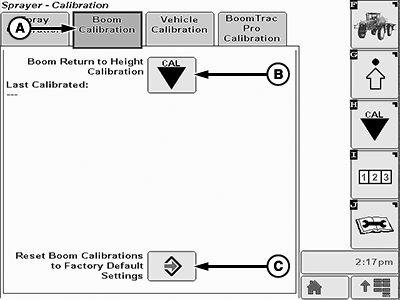
BM011372-UN-03APR17
A - Boom Calibration Tab
B - Boom Return to Height Calibration
C - Reset Boom Calibrations to Factory Default Settings
- Boom Calibration Tab (A): Shows the available calibrations regarding the spray boom.
- Boom Return to Height Calibration (B): Allow the operator to calibrate the spray boom return height.
- Reset Boom Calibrations to Factory Default Settings (C): Allows the operator to reset all spray boom calibrations to factory default settings.
|
LS87647,0000643-19-20170403 |