Reset Boom Calibrations to Factory Default Settings
-
Select the Menu button.

BM011363-UN-31MAR17Menu Button → Sprayer Application Button → Calibration Menu Softkey → Boom Calibration Tab
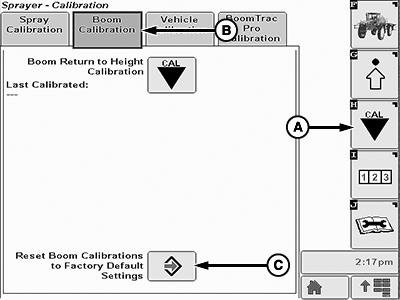
BM011375-UN-03APR17Boom Calibration Page
A - Calibration Menu Softkey
B - Boom Calibration Tab
C - Enter Button
-
Select the Sprayer Application button.
-
Select the Calibration Menu softkey (A).
-
Select the Boom Calibration tab (B).
-
Select the Enter button (C). Reset Boom Calibrations to Factory Default Settings page is displayed.
-
Read all instructions shown on the screen before proceeding.
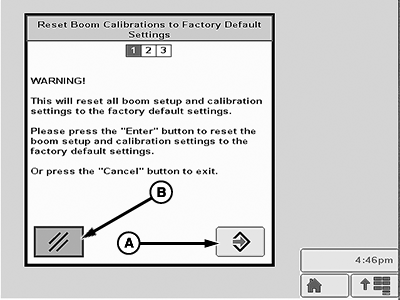
BM011376-UN-03APR17Reset Boom Calibrations to Factory Default Settings—Page 1
A - Enter Button
B - Cancel Button
-
When finished, select the Enter button (A) to proceed or select the Cancel button (B) to exit.
-
Read all instructions shown on the next screen before proceeding.
-
When finished, select the Enter button (A) to proceed or select the Cancel button (B) to exit.
|
LS87647,0000646-19-20170403 |