Current Total Page
Navigate to Current Total Page
-
Select the Menu button.

BM011378-UN-03APR17Menu Button → Sprayer Application Button → Totals and Reports Softkey → Current Tab
-
Select the Sprayer Application button.
-
Select the Totals and Reports softkey.
-
Select the Current tab.
Current Total Page
BM011379-UN-03APR17
Current Total Page
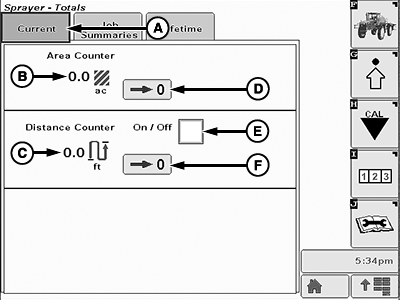
A - Current Tab
B - Area Counter
C - Distance Counter
D - Area Counter Reset Button
E - Distance Counter On-Off
F - Distance Counter Reset Button
- Current Tab (A): Shows the sprayed area and distance counters.
- Area Counter (B): Shows the current sprayed area.
- Distance Counter (C): Shows the current traveled distance.
- Area Counter Reset Button (D): Allows the operator to reset the current area counter.
- Distance Counter On-Off (E): Allows the operator to enable or disable the distance counter.
- Distance Counter Reset Button (F): Allows the operator to reset the current distance counter.
|
LS87647,0000647-19-20170404 |