Enable/Disable Distance Counter
-
Select the Menu button.

BM011378-UN-03APR17Menu Button → Sprayer Application Button → Totals and Reports Softkey → Current Tab
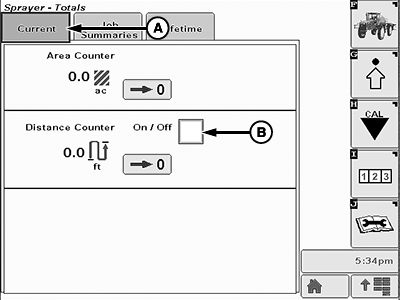
BM011382-UN-03APR17Current Page
A - Current Tab
B - Checkbox
-
Select the Sprayer Application button.
-
Select the Totals and Reports softkey.
-
Select the Current tab.
-
Select the checkbox (B). A check mark appears inside the checkbox.
NOTE: The distance counter automatically switches over to kilometers at 1000 m or miles at 5280 ft.
-
To disable, select the checkbox (B) once again. The check mark disappears from the checkbox.
|
LS87647,000064A-19-20170403 |