Job Summaries Page
Navigate to Job Summaries Page
-
Select the Menu button.

BM011378-UN-03APR17Menu Button → Sprayer Application Button → Totals and Reports Softkey → Job Summaries Tab
-
Select the Sprayer Application button.
-
Select the Totals and Reports softkey.
-
Select the Job Summaries tab.
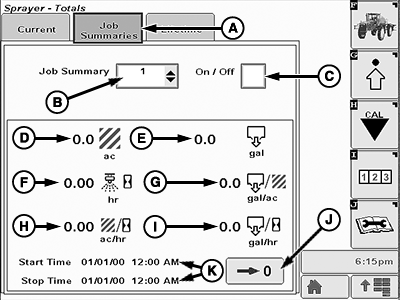
Job Summaries Page
BM011383-UN-03APR17
Job Summaries Page
A - Job Summaries Tab
B - Job Summary Drop-down List
C - Job Summary On-Off
D - Area
E - Volume
F - Spraying Time
G - Volume per Area
H - Area per Hour
I - Volume per Sprayed Hour
J - Reset Button
K - Start and Stop Times
- Job Summaries Tab (A): Shows a report of the main information for a specific job. Use the different jobs to individually analyze the performance of job shifts, operators, or different spraying conditions.
- Job Summary Drop-down List (B): Allows the operator to choose between five different jobs.
- Job Summary On-Off (C): Allows the operator to enable/disable the current job.
- Area (D): Shows the sprayed area for the current job.
- Volume (E): Shows the sprayed volume for the current job.
- Spraying Time (F): Shows the spraying time for the current job.
- Volume per Area (G): Shows the sprayed volume per area for the current job.
- Area per Hour (I): Shows the sprayed area per hour for the current job.
- Volume per Sprayed Hour (J): Shows the volume per sprayed hour for the current job.
- Reset Button (K): Allows the operator to reset all counters for the current job.
- Start and Stop Times (L): Start time appears when the current job is enabled. Stop time appears when the current job is disabled.
|
LS87647,000064B-19-20170405 |