Lifetime Page
Navigate to Lifetime Page
-
Select the Menu button.

BM011378-UN-03APR17Menu Button → Sprayer Application Button → Totals and Reports Softkey → Lifetime Tab
-
Select the Sprayer Application button.
-
Select the Totals and Reports softkey.
-
Select the Lifetime tab.
Lifetime Page
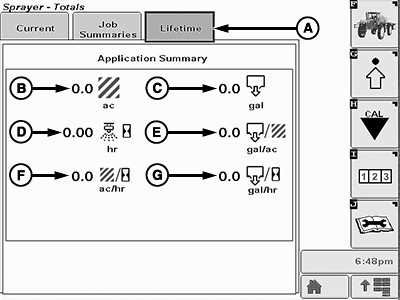
BM011384-UN-03APR17
Lifetime Page
A - Lifetime Tab
B - Area
C - Volume
D - Spraying Time
E - Volume per Area
F - Area per Hour
G - Volume per Sprayed Hour
- Lifetime Tab (A): Shows the history of all the main informations and counters, regardless the job summaries.
- Area (B): Total sprayed area.
- Volume (C): Total sprayed volume.
- Spraying Time (D): Total spraying time.
- Volume per Area (E): Total sprayed volume per area.
- Area per Hour (F): Total sprayed area per hour.
- Volume per Sprayed Hour (G): Total volume per sprayed hour.
|
LS87647,000064C-19-20170405 |