Enable/Disable Job Summary
-
Select the Menu button.

BM011378-UN-03APR17Menu Button → Sprayer Application Button → Totals and Reports Softkey → Job Summaries Tab
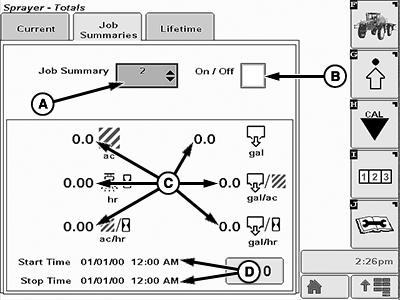
BM011389-UN-05APR17Job Summaries Page
A - Input Box
B - Job Summary On-Off Box
C - Counters
D - Start and Stop Times
-
Select the Sprayer Application button.
-
Select the Totals and Reports softkey.
-
Select the Job Summaries tab.
-
Select the input box (A).
-
Select one of the job inputs from the drop-down list.
-
To enable the current job, select the job summary on-off box (B). A check mark appears inside the checkbox.
NOTE: Start time (D) appears when the job summary is enabled. All specific counters (C) start to count when the job summary is enabled.
-
To disable the current job, select the job summary on-off box (B). The check mark disappears from the checkbox.
NOTE: Stop time (D) appears when the job summary is disabled. All specific counters (C) stop to counting when the job summary is disabled.
|
LS87647,000064D-19-20170405 |