Recent Problems Page
Navigate to Recent Problems Page
-
Select the Menu button.

BM011391-UN-05APR17Menu Button → Sprayer Application Button → Diagnostics Menu Softkey → Recent Problems Tab
-
Select the Sprayer Application button.
-
Select the Diagnostics Menu softkey.
-
Select the Recent Problems tab.
Recent Problems Page
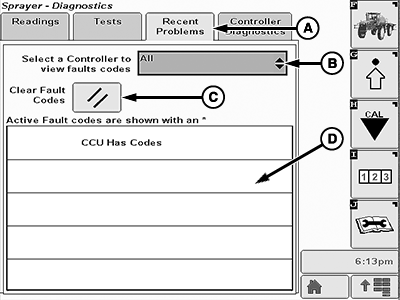
BM011393-UN-05APR17
Recent Problems Page
A - Recent Problems Tab
B - Control Unit Input Box
C - Clear Fault Codes Button
D - Diagnostic Trouble Codes List
- Recent Problems Tab (A): Shows the history and active diagnostic trouble codes.
- Control Unit Input Box (B): Allows the operator to select a specific control unit to view its diagnostic trouble codes.
- Clear Fault Codes Button (C): Allows the operator to clear the diagnostic trouble codes.
- Diagnostic Trouble Codes List (D): Where all the diagnostic trouble codes are displayed. Active diagnostic trouble codes are shown with an *.
|
LS87647,000064F-19-20170405 |