Operate Traction Control
Traction control system is designed to provide additional tractive effort when needed. When engaged, the system provides additional oil flow to the non-spinning wheels when one or more wheels spin out. It does not keep wheels from spinning out. When wheel spin is observed or the operator is in a situation where wheel spin is imminent, engage traction control system. Disengage system as soon as conditions allow.
-
Start machine.
NOTE: Traction control can be operated in 1st, 2nd, or 3rd speed range. When the traction control is engaged, shifting to fourth speed range disengages traction control.
-
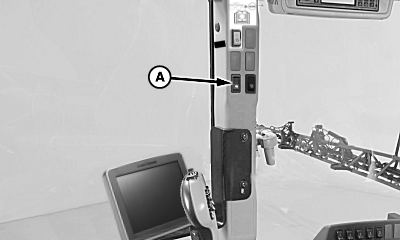
N97431-UN-13MAR12A - Traction Control Switch
Engage the traction control when wheel or wheels start to spin by pressing top of the traction control switch (A). Traction control switch (A) has an internal light that is on when the traction control is engaged.NOTE: Traction control can be engaged while machine is moving.
-
When machine has gotten through terrain that has caused wheels to spin, disengage the traction control by pressing top of the traction control switch (A). Traction control switch (A) light turns off.
IMPORTANT: Always disengage traction control when not needed. When traction control is engaged, hydraulic oil heats up. The SprayStar™ System disengages traction control when hydraulic oil has reached 102°C (215°F). Before the oil cools down, the system cannot be engaged.
|
SprayStar is a trademark of Deere & Company |
OU90500,0000458-19-20170403 |