Control Unit Info
This function is used by the factory to help with the system diagnostic.
-
Select the Menu button (A).

BM011360-UN-31MAR17Menu Button → Message Center Buton → Control Unit Softkey
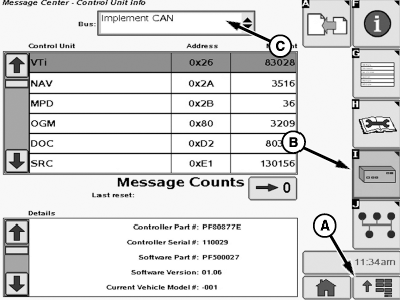
N93013-UN-16NOV16Control Unit Info Page
A - Menu Button
B - Control Unit Softkey
C - Input Box
-
Select the Message Center button.
-
Select the Control Unit softkey (B).
-
Select the input box (C).
-
Select one of the options from the drop-down list:
- Vehicle CAN: Displays the CAN bus information for the sprayer control units.
- Implement CAN: Displays the CAN bus information for the implement/AMS control units.
|
OU90500,000092B-19-20170331 |