Using Drop-Down Lists and Menus
Drop-down menus allow the operator to change the information that is displayed. Drop-down lists allow the operator to choose a specific value for a setting.
-
Select the drop-down input box (A). A drop-down list/menu appears.
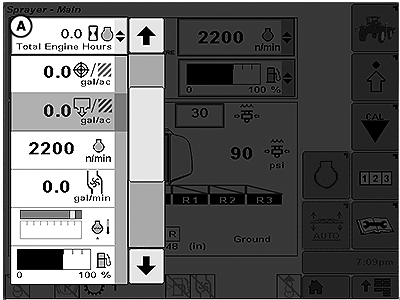
BM017286-UN-30MAR17A - Drop-down Input Box
-
Use the up and down arrows to navigate between the list items.
-
For drop-down menus, select the new information to be shown. Drop-down menus close as the new information is selected.
-
For drop-down lists, select the new input value. Drop-down lists close as the new value is selected.
|
TS95756,00003C3-19-20170406 |