GreenStar™ Connectors
-
Connect the GreenStar™ display (A) on the support (C) with the wing screws (D).
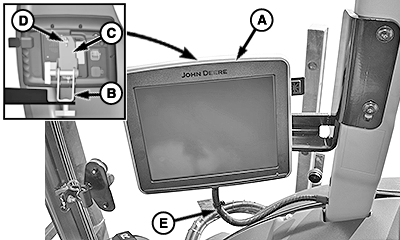
BM017196-UN-03JAN17GreenStar™ Connections
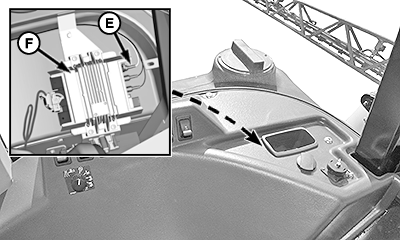
BM017201-UN-05JAN17JDLink™ Electronic Control Unit
BM017207-UN-09JAN17A - GreenStar™ Display
B - Support
C - Support
D - Wing Screw (2 used)
E - Display Wiring Harness
F - JDLink™ Electronic Control Unit
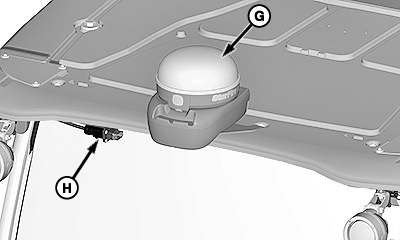
G - StarFire™ Receiver
H - StarFire™ Receiver Connector
NOTE: Adjust the supports (B) and (C) according to required position of GreenStar™ display.
-
Connect the display wiring harness (E) to the JDLink™electronic control unit (F).
NOTE: See your John Deere dealer for the required wiring harness.
-
Connect the StarFire™ connector (H) on the StarFire™ receiver (G).
NOTE: See your John Deere dealer for the required wiring harnesses to connect the StarFire™ receiver.
|
GreenStar is a trademark of Deere & Company JDLink is a trademark of Deere & Company StarFire is a trademark of Deere & Company |
TS95756,00003F1-19-20170109 |