FieldCruise™ Control
The FieldCruise™ control allows the operator to set a predetermined engine speed. Engine speeds between 1800—2250 rpm can be set for FieldCruise™ control.
IMPORTANT: The engine must be running to enable the FieldCruise™ control.
-
Move the hand throttle lever to full throttle position.
-
Select the Menu button.

BM011361-UN-31MAR17Menu Button → Sprayer Application Button → FieldCruise™ Control Softkey
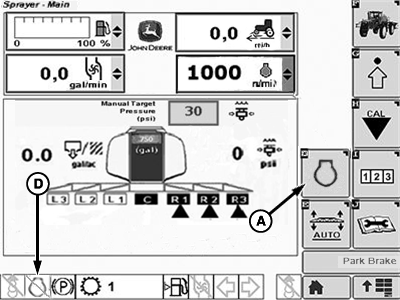
BM017209-UN-31MAR17Spray Main Page
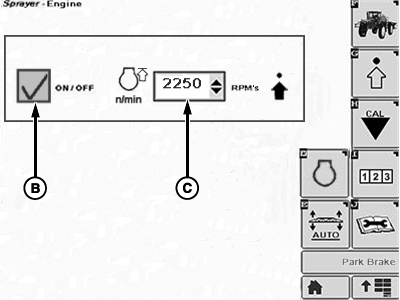
BM017210-UN-31MAR17FieldCruise™ Popup Window
A - FieldCruise™ Control Softkey
B - On-Off Checkbox
C - Input Box
D - FieldCruise™ Indicator
-
Select the Sprayer Application button.
-
Select the FieldCruise™ Control softkey (A).
-
Select the input box (C).
-
Select the desired engine speed from the drop-down list.
-
Select the on-off checkbox (B). A check mark appears inside the checkbox.
NOTE: Engine speed change takes place immediately.
NOTE: When the FieldCruise™ control is enabled, the FieldCruise™ indicator turns on.
-
To disable the FieldCruise™ control, select the checkbox (B) once again. The check mark disappears from the checkbox and the engine takes the speed set by the hand throttle lever.
|
FieldCruise is a trademark of Deere & Company |
TS95756,00003F9-19-20170331 |