Set Sensor Target Mode
The sensor target mode has two different settings:
-
Canopy mode: Causes a spray boom height
sensor to react to the first thing it detects looking vertically to
the ground.
It can be used to maintain a spray boom height relative to the top of the crop canopy or to the ground if no crop exists.
-
Ground mode: Causes a spray boom height
sensor to look past the first obstacle it detects looking vertically
to the ground.
This mode can be used to maintain the spray boom height relative to the ground when there is crop present in the field.
NOTE: It is important to note that in the dense crop conditions, the spray boom height sensors may not be able to detect the ground. In this case, it is better to run in canopy mode and maintain some distance between the spray booms and the top of the crop canopy.
-
Select the Menu button.
-
Select the Sprayer Application button.
-
Select the BoomTrac Pro™ softkey (B) or the BoomTrac Pro™ button.
-
Select the desired mode in the sensor target mode drop-down list (A).

BM017293-UN-05APR17Menu Button → Sprayer Application Button → BoomTrac Pro™ Softkey → BoomTrac Pro™ Page

BM017295-UN-06APR17Menu Button → Sprayer Application Button → BoomTrac Pro™ Button → BoomTrac Pro™ Page
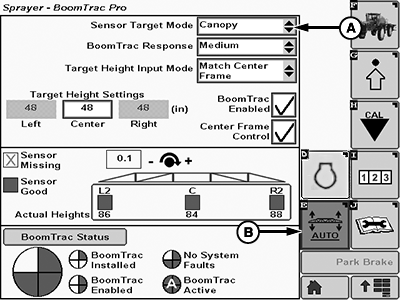
BM017296-UN-06APR17BoomTrac Pro™ Page
A - Sensor Target Mode Drop-down List
B - BoomTrac Pro™ Softkey
|
BoomTrac Pro is a trademark of Deere & Company |
TS95756,00004DA-19-20170413 |