Set BoomTrac Pro™ Response
The BoomTrac Pro™ response allows the operator to adjust the response time of the spray booms when changing the height.
The response time has three different settings:
- Low: Indicates the lowest response time.
- Medium: Indicates an intermediate response time.
- High: Indicates the highest response time.
-
Select the Menu button.
-
Select the Sprayer Application button.
-
Select the BoomTrac Pro™ softkey (B) or the BoomTrac Pro™ button.
-
Select desired option in the BoomTrac Pro™ response drop-down list (A).

BM017293-UN-05APR17Menu Button → Sprayer Application Button → BoomTrac Pro™ Softkey → BoomTrac Pro™ Page

BM017295-UN-06APR17Menu Button → Sprayer Application Button → BoomTrac Pro™ Button → BoomTrac Pro™ Page
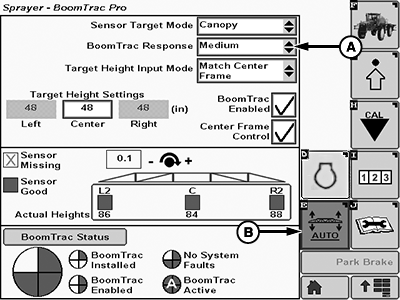
BM017297-UN-06APR17BoomTrac Pro™ Page
A - BoomTrac Pro™ Response Drop-down List
B - BoomTrac Pro™ Softkey
|
BoomTrac Pro is a trademark of Deere & Company |
TS95756,00004DB-19-20170413 |