Set Target Height Input Mode
The target height input mode has two different settings available:
- Match Center Frame Mode: this option matches the left and right target heights to the center frame target height. Only the center frame height will be available to change. When this mode is enabled the center frame can be raised or lowered using the switch on the multi-function lever.
-
Individual Mode: Allows the operator
to individually change the target height of each spray boom section.
NOTE: In the individual mode, the target heights are the distance
from the bottom of the nozzle tips to the target.
-
Select the Menu button.
-
Select the Sprayer Application button.
-
Select the BoomTrac Pro™ softkey (B) or the BoomTrac Pro™ button.

BM017293-UN-05APR17Menu Button → Sprayer Application Button → BoomTrac Pro™ Softkey → BoomTrac Pro™ Page

BM017295-UN-06APR17Menu Button → Sprayer Application Button → BoomTrac Pro™ Button → BoomTrac Pro™ Page
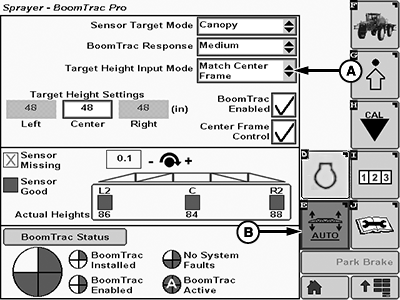
BM017298-UN-06APR17BoomTrac Pro™ Page
A - Target Height Input Mode Drop-down List
B - BoomTrac Pro™ Softkey
-
Select the desired option in the target height input mode drop-down list (A).
|
BoomTrac Pro is a trademark of Deere & Company |
TS95756,00004DC-19-20170413 |