BoomTrac Pro™ Page Setup
Navigate to BoomTrac Pro™ Page (Option 1)

BM030715-UN-23NOV17
Menu Button → Sprayer Application Button → BoomTrac Pro™ Softkey
-
Select the Menu button.
-
Select the Sprayer Application button.
-
Select the Boom Trac Pro™ softkey.
Navigate to BoomTrac Pro™ Page (Option 2)

BM030716-UN-23NOV17
Menu Button → Sprayer Application Button → BoomTrac Pro™ Button
-
Select the Menu button.
-
Select the Sprayer Application button.
-
Select the Boom Trac Pro™ button.
BoomTrac Pro™ Page
Select one of the both previous options to access the BoomTrac Pro™ page.
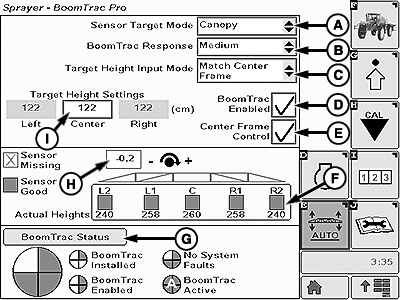
On Boom Trac Pro™ Page, the following are displayed and can be changed:
BM030718-UN-23NOV17
-
Sensor Target Mode (A)—This drop-down
list allows the operator to select between Canopy and Ground modes of operation.
- Canopy Mode: Causes a boom height sensor to react to the first thing it sees looking vertically to the ground. This mode can be used to maintain a boom height relative to the top of the crop canopy or to the ground if no crop exists.
- Ground Mode: Causes a boom height sensor to look past the first obstacle it sees looking vertically to the ground. This mode can be used to maintain the boom height relative to the ground when there is crop present in the field. It is important to note that in the dense crop conditions, the boom height sensors are not completely able to see the ground. In this case, it is better to run in canopy mode and maintain some distance between the booms and the top of the crop canopy.
IMPORTANT: In dense crop conditions, the spray boom height sensor may not be able to detect the ground. In this case, it is better to run in canopy mode and maintain some distance between the spray booms and the top of the crop canopy.
-
BoomTrac Pro™ Response (B)—This drop-down
list allows the operator to adjust the response time of the spray
booms when changing the height select between:
- Low: Indicates the lowest response time.
- Medium: Indicates an intermediate response time.
- High: Indicates the highest response time.
-
Target Height Input Mode (C)—This
drop-down list allows the operator to select between:
- Match Center Frame Mode: This mode matches the left and right target heights to the center frame target height (I). In this mode, the center frame height is highlighted. The center frame target height (I) is the only height the operator can modify when operating in this mode.
- Individual Mode: This mode allows the operator to individually change the target height of each boom section (that is, left boom, right boom, and center frame).
- BoomTrac Pro™ (D)—When checked, it allows the system to be activated using the BoomTrac Pro™ resume button on the multi-function lever. Unchecking the box keeps the system from turning on using the multi-function lever resume button.
- Center Frame (E)— When checked it allows the center frame to control up and down through the field based on the center frame sensor. In some conditions, it is beneficial to uncheck this box to keep the center frame from over-controlling. When unchecked the center frame controls once to target height and stop.
- Spray Boom Section Sensor (F)—This softkey allows the operator to access the BoomTrac Pro™ sensor setup page. (See Setup BoomTrac Pro™ Sensor in this section)
- BoomTrac Pro™ Status (G)—This softkey allows the operator to access BoomTrac Pro™ status page. (See BoomTrac Pro™ System Status in this section
- Roll Sensor (H)— This input box allows operator to set the rotation direction of the center frame by using the minus (—) and plus (+) next to the input box.
- Target Height Settings (I)—This input box allows operator to set the spray boom section height..
|
BoomTrac Pro is a trademark of Deere & Company |
LR35023,0000142-19-20171123 |