General Operating Instructions and Entering Program Mode
Diagnosis with the digital display (on tractors with PowrQuad Plus transmission only)
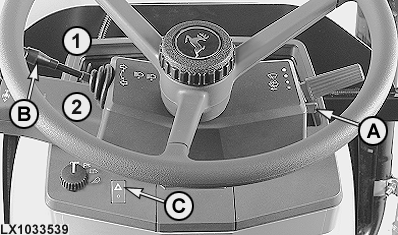
LX1033539-UN-21NOV03
A - Roll mode switch
B - Turn signal lever
C - Hazard warning switch
1 - Right turn signal
2 - Left turn signal
|
General operating instructions |
||
|---|---|---|
|
Tractor with digital display without HMS II |
Tractor with digital display and HMS II |
|
|
Entering the Program Mode |
Move the main switch to the on position, wait for at least 4 seconds and then pull and hold roll mode switch (A) |
|
|
Selecting control units |
Move turn-signal lever (B) once in direction 1 or 2, and pull it back again |
Move turn-signal lever (B) twice in brief succession in direction 1 or 2, and pull it back again |
|
Confirming control units |
Switch the hazard warning switch (C) on and off |
|
|
Leaving the control unit |
Pull turn-signal lever (B) towards the steering wheel (flash-to-pass) for at least 2 seconds |
|
|
Selecting addresses (in increments of 1) |
Move turn-signal lever (B) once in direction 1 or 2, and pull it back again |
Move turn-signal lever (B) twice in brief succession in direction 1 or 2, and pull it back again |
|
Selecting addresses (in increments of 10) |
Move turn-signal lever (B) to 1 or 2, and leave it there |
|
|
Selecting addresses (interrupting an increment of 10) |
Switch the turn signal lever (B) back to neutral |
|
|
Accessing input addresses (INP) |
Pull turn signal lever (B) briefly towards the steering wheel (flash-to-pass) |
|
|
Changing an input address (INP) |
Switch the hazard warning switch (C) on and off |
|
|
Selecting information (numerical value) |
Move turn-signal lever (B) once in direction 1 or 2, and pull it back again |
Move turn-signal lever (B) twice in brief succession in direction 1 or 2, and pull it back again |
|
Switching from one item of information (numeric values) to the next |
Pull turn signal lever (B) briefly towards the steering wheel (flash-to-pass) |
|
|
Saving information |
Switch the hazard warning switch (C) on and off |
|
|
Canceling a procedure |
Pull turn-signal lever (B) towards the steering wheel (flash-to-pass) for at least 2 seconds |
|
|
Clearing the diagnostic trouble codes |
Switch the hazard warning switch on and off when “CLr?” is displayed |
|
Digital display
LX1028083-UN-11DEC01
LX1028091-UN-20DEC01
LX1028092-UN-20DEC01
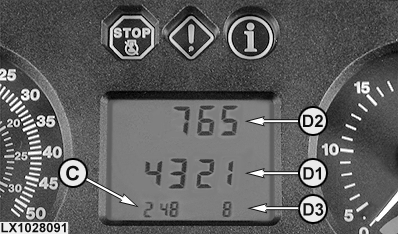
C - Address
D1 - Information (display position 1 - 4)
D2 - Information (display position 5 - 7)
D3 - Information (display position 8)
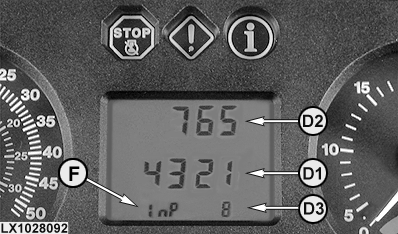
F - Input address
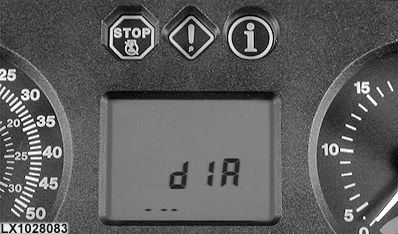
The display shows "diA" first. Once a control unit has been selected and confirmed, the display changes.
The left side of bottom row (C) displays the address.
If it is an input address, the display switches between address and “InP” (F).
The medium row (D1) dipslays the information. If the four digits are not enough, the three digits in the upper row (D2) and one digit on the right side of the bottom row (D3) are used. A diagnostic trouble code consisting of 8 digits (6 digits before the decimal, 2 digits after the decimal) is displayed as follows:
- Reading from left to right, the first four digits are displayed at position (D1)
- The next three digits are displayed at position (D2)
- The last digit is displayed at position (D3)
Diagnosis with Performace Monitor
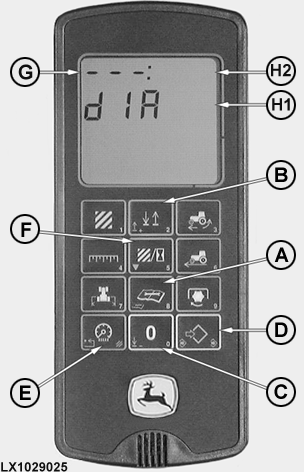
LX1029025-UN-26APR02
A - "Service" key
B - "2" (up) key
C - "0" (down) key
D - "Set/Save" key
E - "Clear" key
F - "5" key
G - Address
H1 - Information (display position 1 - 5)
H2 - Information (display position 6 - 8)
|
General operation |
|
|---|---|
|
Entering the Program Mode |
Move the main switch to the “On” position, wait for at least 8 seconds, then press the "Service" key (A) and hold it |
|
Selecting control units |
Press "2" key (B) or "0" key (C) |
|
Confirming control units |
Press the "Set/Save" key (D) |
|
Leaving the control unit |
Press the "Clear" key (E) |
|
Selecting addresses (in increments of 1) |
Press "2" key (B) or "0" key (C) |
|
Selecting addresses (in increments of 10) |
Press and hold "2" key (B) or "0" key (C) |
|
Accessing an input address (INP) |
Press "5" key (F) |
|
Changing an input address (INP) |
Press the "Set/Save" key (D) |
|
Key in information (numerical value) |
Press the numbered buttons |
|
Saving information |
Press the "Set/Save" key (D) |
|
Canceling a procedure |
Press the "Clear" key (E) |
|
Clearing diagnostic trouble codes |
Press the "Set/Save" key (D) when “CLr?” is displayed |
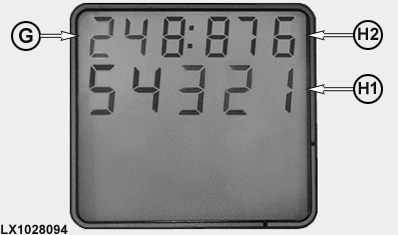
LX1028094-UN-20DEC01
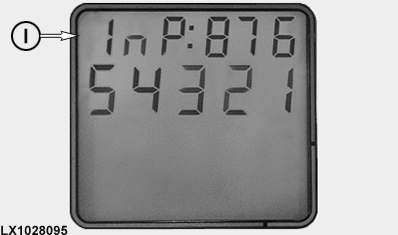
LX1028095-UN-20DEC01
G - Address
H1 - Information (display positions 1 - 5)
H2 - Information (display positions 6 - 8)
I - Input address
Display
The top row on the display is divided by a colon.
The three figures at the left of the top row show address (G).
If the address is an input address, the display alternates between the address and "InP" (I).
Information (H1) is shown on the bottom line. If five figures are not enough, the three figures on the right of top row (H2) may be used as well. A diagnostic trouble code consisting of 8 digits (6 digits before the decimal, 2 digits after the decimal) is displayed as follows:
- Reading from left to right, the first five digits are displayed at position (H1)
- The next three digits are displayed at position (H2)
Performance monitor used for test purposes
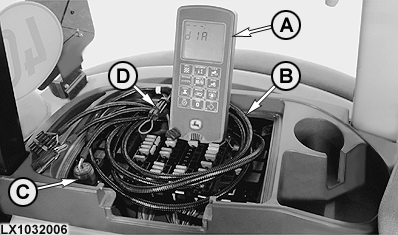
LX1032006-UN-07APR03
The performance monitor used for test purposes is required on tractors with PowrQuad transmission since no information can be accessed via the basic informator with which these tractors are equipped.
When used for testing, a performance monitor functions in the same way as a permanently connected performance monitor.
A performance monitor (A) used for test purposes is connected to service socket (C) via test lead (B).
The power supply to the performance monitor can be cut off by disconnecting the test lead at connection (D). This is necessary because the performance monitor receives its power via the service socket from the battery's positive terminal and not via the main (key) switch.
If test instructions ever tell you to switch the main (key) switch on or off, you must at the same time connect or disconnect the test lead connection.
Entering the Program Mode
1 Entering program mode via the digital display
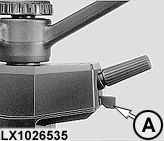
LX1026535-UN-27APR01
The main (key) switch must be at "IGN" for longer than 4 seconds.
Actuate the roll-mode switch (RMS) (A), and hold it.
Hold the RMS until the display changes to "Dia".
GO TO: Accessing addresses and diagnostic trouble codes.
Contact dealer.
2 Entering program mode via the performance monitor

LX1026536-UN-27APR01
The main (key) switch must be at "IGN" for longer than 8 seconds.
Press the "Service" key until the display changes to "Dia".
If a performance monitor is used for test purposes: If test instructions ever tell you to switch the main (key) switch to "IGN" or "OFF", you must at the same time connect or disconnect the test lead connection.
GO TO: Accessing addresses and diagnostic trouble codes.
Contact dealer.
|
OU12401,0001010-19-20031201 |