Using LoadMatch—If Equipped
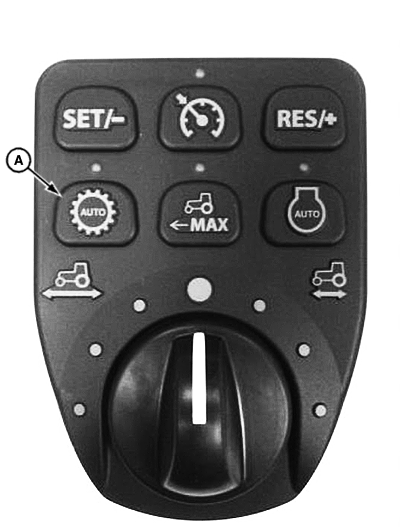
LV17697-UN-03MAY13
A - LoadMatch Switch
LoadMatch™ enables the operator to prevent the engine from stalling during heavy load applications such as operating with a loader.
Engaging LoadMatch
-
Determine if a heavy load application will be performed.
-
Press LoadMatch switch (A).
Disengaging LoadMatch
Press LoadMatch switch (A).
Changing LoadMatch Settings for Machines without LoadMatch Switch (if equipped)
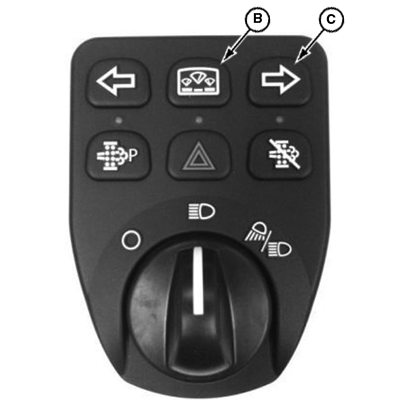
LV18363-UN-17JUL13
B - Dash Panel Module
C - Right Turn Signal Switch
-
Turn key switch to on position.
-
Press and hold the dash panel module (B) for approximately 4 seconds.
-
The display mode screen should read “Release”.
-
Press the right turn signal switch (C) on the display mode switch and scroll down until the display mode screen reads “load”.
-
Press the display mode switch to select “load”.
-
Press the right turn signal switch to select either “on” or “off”.
-
Press the display mode switch to accept the desired setting.
|
LoadMatch is a trademark of Deere & Company |
KN52281,1004851-19-20131031 |