Using MotionMatch—If Equipped
LV17699-UN-03MAY13
LV18364-UN-17JUL13
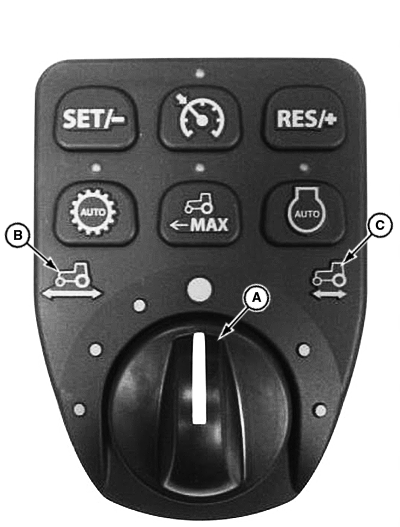
A - MotionMatch Switch
B - Longer Distance Icon
C - Shorter Distance Icon
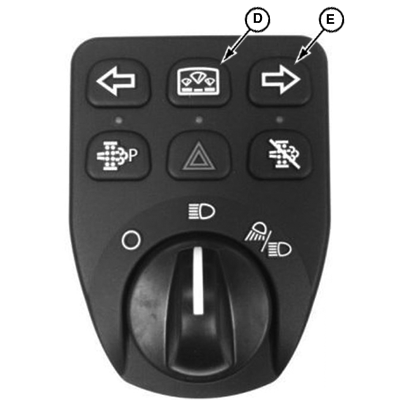
D - Display Mode Switch
E - Right Turn Signal Switch
MotionMatch™ enables the operator to adjust machine acceleration and deceleration rates. Shorter starting and stopping distances can be set for applications requiring rapid changes in direction, such as operating with a loader. Longer starting and stopping distances can be set to avoid turf damage in other applications.
- Turn MotionMatch switch (A) toward the longer distance icon (B) for longer acceleration and deceleration distances.
- Turn MotionMatch switch (A) toward the shorter distance icon (C) for shorter acceleration and deceleration distances.
Changing MotionMatch Settings for Machines without MotionMatch Switch
NOTE: This feature requires a software download from the dealer.
-
Press and hold the display mode switch (D) for approximately 4 seconds.
-
The instrument panel screen should read “Release”.
-
Press the right turn signal switch (E) and scroll down until the instrument panel screen reads “coast”.
-
Press the display mode switch to select “coast”.
-
Press the right turn signal switch to select one of three options.
- Long
- Default
- Short
-
When the desired option is selected, press the display mode switch.
-
To verify selection, turn key switch off and back to the on position.
|
MotionMatch is a trademark of Deere & Company |
KN52281,1004853-19-20131105 |