Operating 3-Point Hitch
NOTE: The 3-point hitch on your machine is classified as a category 1 hitch.
Center Link Storage Position
LV26037-UN-07SEP16
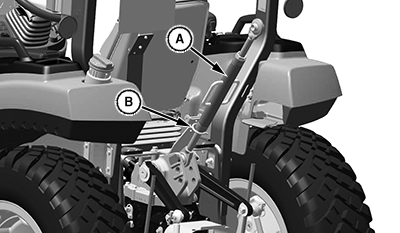
A - Center Link
B - Storage Hook
Place center link (A) in storage hook (B) when the hitch is not in use.
Positioning Center Link
-
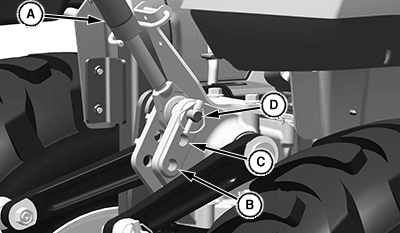
LV25423-UN-01JUN16A - Center Link
B - Light to Medium Draft Loads
C - Medium to Heavy Draft Loads
D - Very Heavy Draft Loads
For light and medium draft loads: Install center link (A) in bottom hole (B) of mounting bracket. Example of light and medium draft load implements include a landscape rake. A category 1 implement tilts forward while raising in this position.
- For medium and heavy draft loads: Install center link in middle hole (C) of mounting bracket. Example of medium and heavy draft load implements include a tiller or box blade. A category 1 implement tilts forward slightly while raising in this position.
- For very heavy draft loads: Install center link in top hole (D) of mounting bracket. Example of very heavy draft load implements include a plow or ripper. A category 1 implement raises, but angle remains constant.
Using Rockshaft Control Lever
LV26024-UN-01SEP16
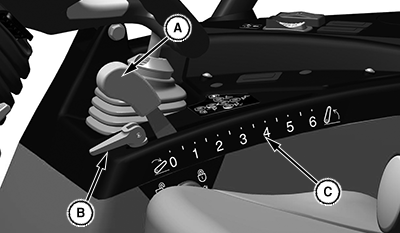
A - Rockshaft Control Lever
B - Rockshaft Depth Stop
C - Rockshaft Position Identifiers
Use rockshaft control lever (A) to raise and lower equipment attached to 3-point hitch.
The nine rockshaft position identifiers (C) do not signify specific operating depths. When rockshaft control lever is moved forward, draft arms lower closer to ground.
Lower Implement: Push rockshaft control lever forward.
Raise Implement: Pull rockshaft control lever rearward.
The adjustable rockshaft depth stop (B) can be adjusted to maintain a particular implement operating depth. To use the depth stop knob:
- Operate implement for a few minutes to determine the desired operating depth.
- Pull up on rockshaft depth stop lever (B).
- Move lever against rockshaft control lever.
- Push lever down to keep the depth stop in position. Implement will operate in same position each time rockshaft control lever is pushed against the depth stop.
Using Rate of Drop/Lock Valve
 CAUTION: Avoid Injury! Excessive rate-of-drop may cause injury
or damage. Fully lowering implement should take at least 2 seconds.
CAUTION: Avoid Injury! Excessive rate-of-drop may cause injury
or damage. Fully lowering implement should take at least 2 seconds.
IMPORTANT:
- To prevent overheating hydraulic oil and damaging tractor, do not raise rockshaft when drop/lock valve is closed.
- Do not use implements or controls with valve locked, damage to tractor could occur.
The rate of drop/lock valve (A) controls the rate of rockshaft drop when rockshaft control lever (B) is operated. This valve provides direct rate of drop control for 3-point hitch mounted implements. The valve can also be used to hydraulically lock rockshaft (3-point hitch) in a desired position. The tractor can be operated with rate of drop valve closed. With this valve closed, the rockshaft can be raised but not lowered.
LV25671-UN-30JUN16
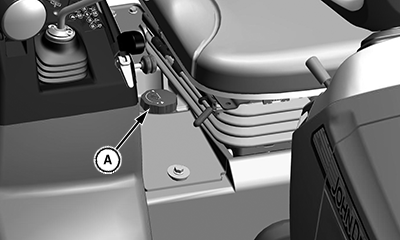
A - Drop/Lock Rate Valve Knob
Increase Rate-of-Drop: Rotate drop/lock rate valve knob (A) counterclockwise to make drop faster.Decrease Rate-of-Drop: Rotate drop/lock rate valve knob (A) clockwise to make drop slower.
CAUTION: Avoid Injury! Do not use the rockshaft drop/lock valve
for holding an attachment in raised position for service work. Loss
of hydraulic pressure could result in sudden drop of attachment. Lower
attachment onto blocks or remove from machine before servicing.
Lock 3-Point Hitch: Rotate drop/lock rate valve knob (A) clockwise until tight.
Unlock 3-Point Hitch: Rotate drop/lock rate knob (A) counterclockwise.
|
UP00731,00002B5-19-20160907 |