Attach Broom to Front Quick Hitch
LV27558-UN-02FEB17
LV27559-UN-02FEB17
LV27560-UN-02FEB17
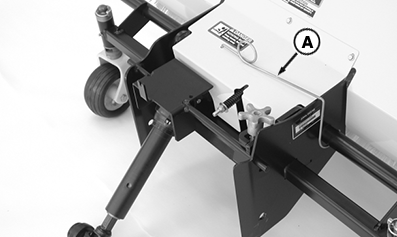
A - PTO Shaft Support
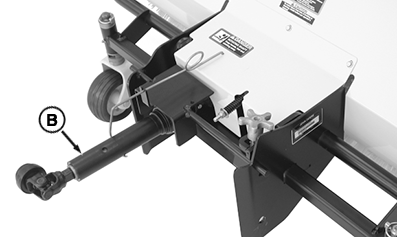
B - PTO Shaft
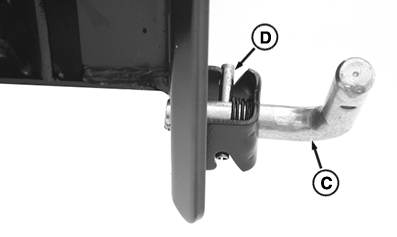
C - L-Pins
D - Roll Pin
-
Park machine safely.
-
Review instructions on using SCV lever included in your tractor operator’s manual.
-
Remove the PTO shaft support (A) from storage position.
-
Swing shaft support toward center of the broom frame and position as shown. Place the PTO shaft (B) in the support.
-
Rotate both L-pins (C) on the tractor front quick hitch, and turn to unlocked position with roll pin (D) in grooves as shown.
-
Start the tractor engine.
-
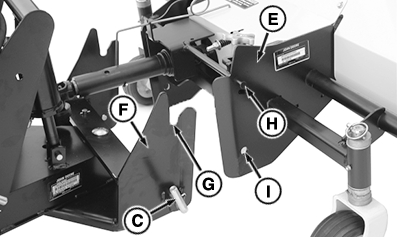
LV27561-UN-02FEB17E - Broom Mounting Frame
F - Front Quick Hitch
G - Notches
H - Pins
I - Holes
Drive tractor forward and align the broom mounting frame (E) with the front quick hitch (F). Notches (G) in hitch must be lower than pins (H) on broom.- Move the tractor SCV lever forward to lower the hitch. Move the SCV lever rearward to raise the hitch.
- Move the tractor SCV lever to the left to angle the hitch to the left. Move the SCV lever to the right to angle the hitch to the right.
-
Drive tractor forward slowly to engage pins (H) in notches (G).
-
Raise the hitch, checking to be sure that pins engage notches. Lower the hitch until L-pins (C) snap into holes (I) on sides of the broom frame.
-
Park machine safely.
-
Check to be sure that L-pins are in locked position, fully engaged in the broom frame. Adjust as needed.
|
UP00731,00001EF-19-20170228 |