Instrument Panel
LV17507-UN-29APR13
LV17524-UN-29APR13
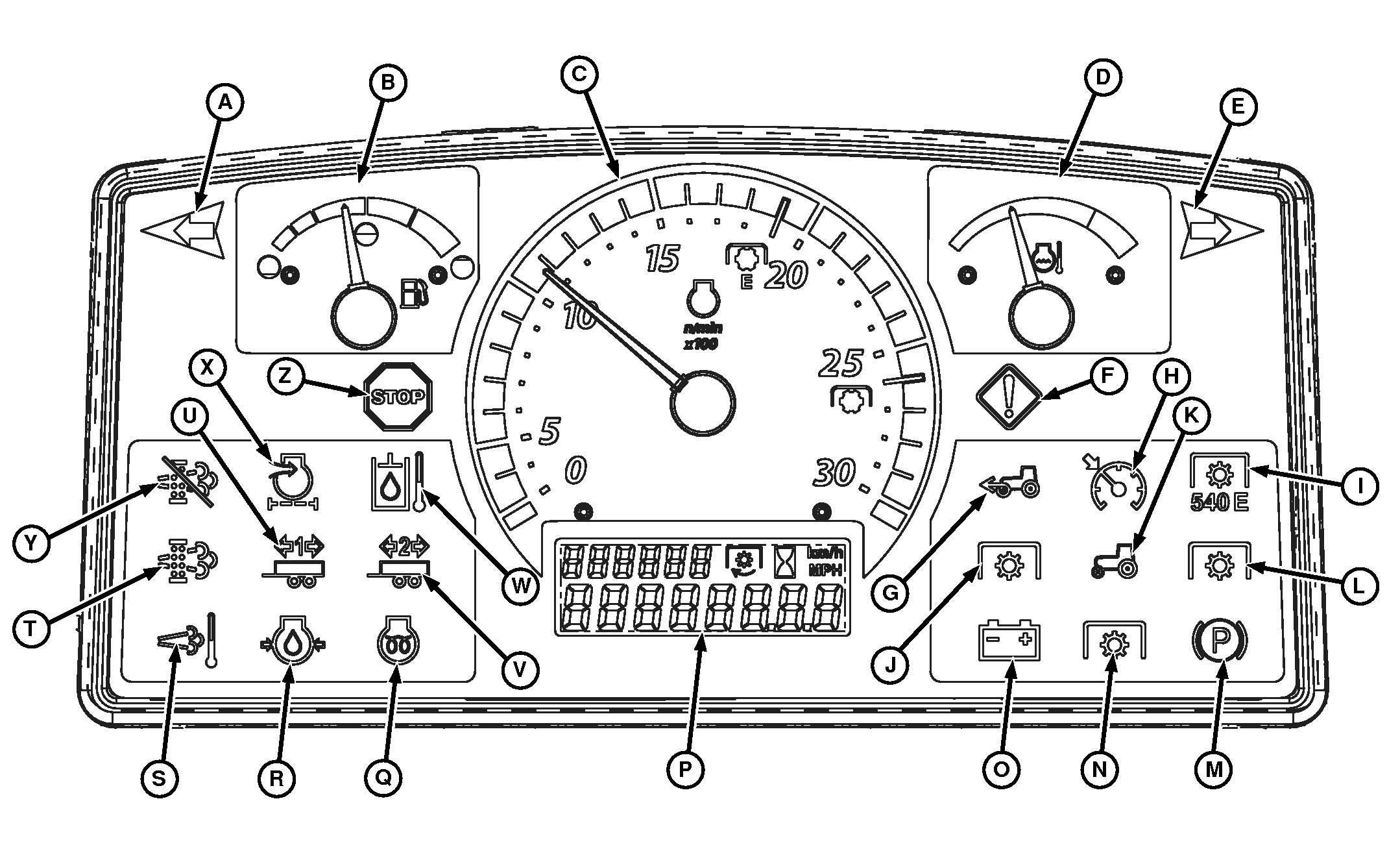
B—Fuel Gauge—Shows the amount of fuel in the fuel tank (R models only).
C—Tachometer—Shows engine speed in 100s. Example: If indicator is pointing at 20, engine speed is 2000 rpm.
| Engine Idle | ||
| Low Idle | Speed | 950 ± 25 rpm |
| Rated | Speed | 2600 rpm |
| High Idle | Speed | 2750 ± 50 rpm |
D—Engine Coolant Temperature Gauge—Indicates temperature of cooling system. If gauge needle reaches red range, engine is overheating and engine will derate.
If engine is overheated, remove load on machine immediately. Reduce engine to idle speed and allow engine to cool. Check coolant level in overflow bottle and check for air flow blockage to radiator. If coolant level is correct and needle stays in red range after cleaning grille, stop engine.
E—Right Turn Signal/Warning Flasher Indicator Light—Flashes when right turn signal switch is depressed or when hazard light switch is depressed.
F—Service Alert Indicator—Illuminates when a malfunction occurs (review error message in information display). If necessary, have John Deere dealer diagnose machine.
G—Front Wheel Drive Indicator—Illuminates when MFWD is engaged (R models only).
H—Cruise Control Light—Illuminates when cruise control is engaged (if equipped).
I—Rear 540E PTO—Illuminates when the PTO is in the 540E mode and the rear PTO is on (R models only)..
J—Front PTO Indicator Light—Illuminates when Front PTO is engaged (if equipped).
K—PTO Indicator Light—Illuminates when PTO is engaged.
L—Rear PTO Indicator Light—Illuminates when rear PTO is engaged.
M—Park Brake Light—Illuminates when ignition key is in the run position and park brake is locked.
N—Not Used
O—Alternator/Battery Charging Light—Illuminates when ignition key is in the run position and engine is not running. If light turns on while engine is running, alternator is not charging battery. Move engine speed control lever to full throttle position. Stop engine if light remains on.
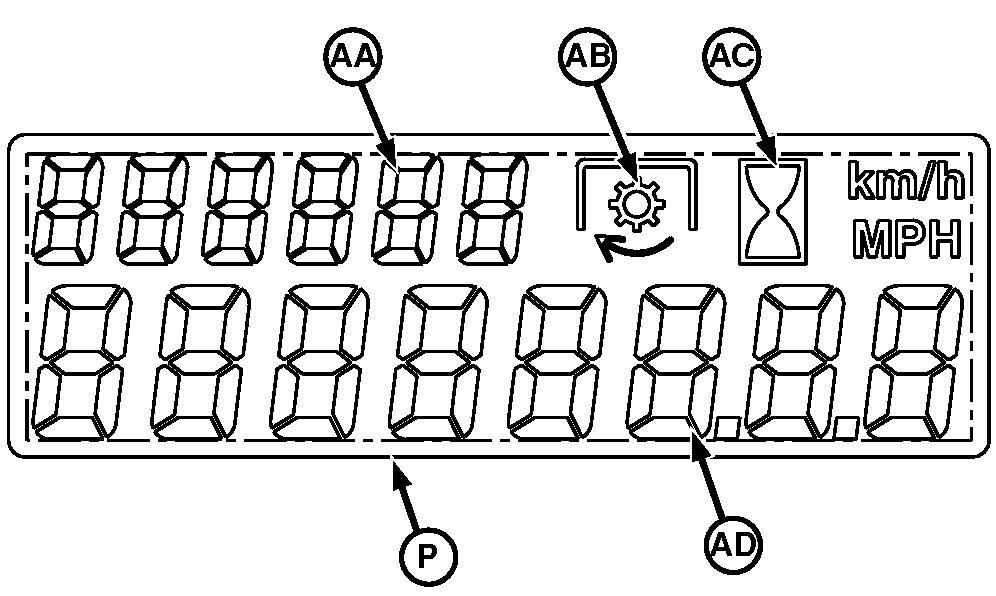
P—Information Display—Displays speedometer (4R models only), hour meter, PTO hour, PTO speed, regen information and diagnostic trouble codes (if active).
Q—Engine Glow Plug Indicator Light—Illuminates when ignition key is in the ON position and engine glow plugs are being energized. Glow plugs are energized whenever starter is engaged.
R—Engine Oil Pressure Light—Illuminates when key switch is in the run position and the engine is not running. If this light turns on while engine is running, engine oil pressure is too low. Stop engine.
S—High Exhaust Temperature Indicator—Illuminates when an active DPF filter cleaning is being performed.
T—Exhaust Filter Cleaning Indicator—Illuminates when soot levels in the filter are high and exhaust filter cleaning is needed.
U—Trailer 1 Indicator—Starts flashing when trailer turn signal or hazard warning lights are switched on (if equipped).
V—Trailer 2 Indicator—Starts flashing when trailer turn signal or hazard warning lights are switched on (if equipped).
W—Hydraulic Oil Temperature Light—Not Used
X—Engine Air Cleaner Restriction Indicator—Illuminates when air cleaner element is clogged (clean or replace element). If necessary, have John Deere dealer diagnose machine (R models only).
Y—Not Used
Z—Stop Indicator—Illuminates when a serious malfunction occurs. SHUT OFF engine IMMEDIATELY and determine cause (review error message in information display). If necessary, have John Deere dealer diagnose machine.
AA—Machine Information Display—When in diagnostic mode, display shows name of control unit that is experiencing fault.
AB—PTO Icon—Illuminates when PTO is operating and PTO speed is displayed in the vehicle information display.
AC—Hour Meter Icon—Illuminates and flashes when engine hours are accumulating and displays on the information display.
AD—Machine Information Display—Shows machine wheel speed (R models only), engine hours, PTO speed, and diagnostic information.
Adjusting Instrument Panel Backlighting
Backlight illumination is 100% when the headlights are off. Backlight adjustment is used when the headlights are on.
-
Press and hold the display mode switch for approximately 4 seconds.
-
The display mode screen should read “rELEAS”, then “NIGHT”.
-
Press the display mode switch again to accept.
-
Press the left arrow switch to toggle to the second digit on the instrument panel.
-
Press the right arrow to toggle to desired illumination.
The range for illumination is from 1—100.
-
Press the left arrow switch to toggle to the third digit on the instrument panel.
-
Press the right arrow to toggle to desired illumination.
-
Press the display mode switch again to exit.
|
UP00731,0000285-19-20170817 |