Use Rockshaft Control Lever
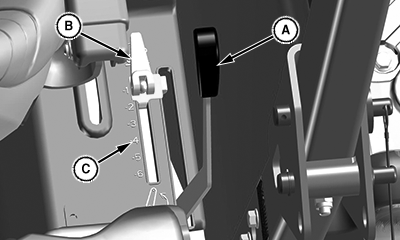
LV28082-UN-11MAY17
Open Operator Station Rockshaft Control Lever
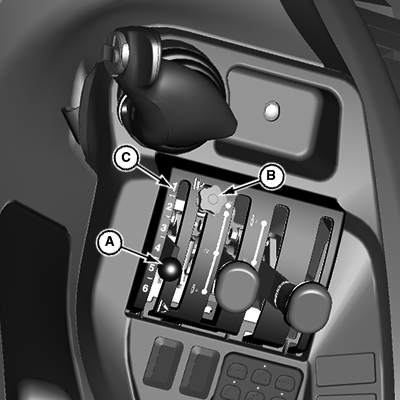
LV17865-UN-23MAY13
Cab Rockshaft Control Lever
A - Rockshaft Control Lever
B - Rockshaft Depth Stop
C - Rockshaft Position Identifiers
Use rockshaft control lever (A) to raise and lower equipment attached to 3-point hitch.
The six rockshaft position identifiers (C) do not signify specific operating depths. When rockshaft control lever is moved forward, draft arms lower closer to the ground.
Lower Implement: Push rockshaft control lever forward.
Raise Implement: Pull rockshaft control lever rearward.
The rockshaft depth stop (B) can be adjusted to maintain a particular implement operating depth. To use the depth stop knob:
-
Operate implement for a few minutes to determine the desired operating depth.
-
Loosen the depth stop knob.
-
Move knob against rockshaft control lever.
-
Tighten knob to keep the depth stop in position. Implement will operate in same position each time rockshaft control lever is pushed against the depth stop.
|
UP00731,00002FB-19-20170511 |