Using 3rd Selective Control Valve (SCV) Outlet—If Equipped
 Avoid injury! Escaping fluid under high pressure can
penetrate the skin and cause serious injury. Avoid the hazard by relieving
pressure before connecting hydraulic or other lines. Tighten all connections
before applying pressure.
Avoid injury! Escaping fluid under high pressure can
penetrate the skin and cause serious injury. Avoid the hazard by relieving
pressure before connecting hydraulic or other lines. Tighten all connections
before applying pressure.
• Search for leaks with a piece of cardboard. Protect hands and body from high-pressure fluids.
• If an accident occurs, see a doctor immediately. Any fluid injected into the skin must be surgically removed within a few hours or gangrene may result. Doctors unfamiliar with this type of injury should reference a knowledgeable medical source. Such information is available from Deere & Company Medical Department in Moline, Illinois, U.S.A. In the United States and Canada only, this information may be obtained by calling 1-800-822-8262.
Some continuous flow attachments can elevate tractor oil temperature. Make sure to refer to the operator’s manual of the attachment and supply the device the proper flow rate. In the event that the tractor hydraulic system overheats, the valve will disengage, and the light will remain lit. Operate the tractor for 10 minutes at mid engine speed to cool it down, identify the cause of the overheating, and resume work.
This machine model series can be equipped with an optional 3rd selective control valve (SCV) outlet kit to operate hydraulically driven implements from one set of outlets at the mid-mount position or the rear-mount position.
The machine-mounted hydraulic outlets are female quick couplers.
Using 3rd Selective Control Valve (SCV) Continuous Flow Switch
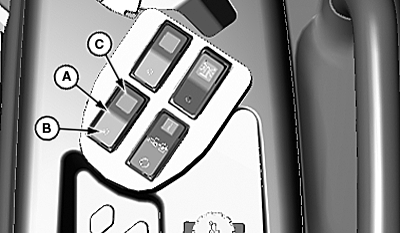
LV29486-UN-11OCT17
3rd SCV Continuous Flow Switch Shown; M Series Tractor (HST Only)
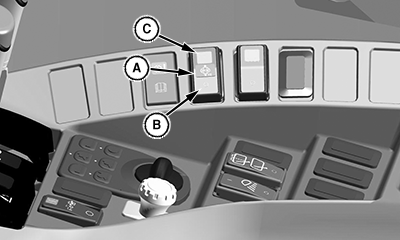
LV29386-UN-07SEP17
3rd SCV Continuous Flow Switch (Cab Shown; OOS Similar)
A - Continuous Flow Switch
B - Off
C - Enable/Activate
Continuous flow will not be available to the rear outlets on machines equipped with the third selective control valve and the diverter option.
• Continuous Flow Switch (A): This switch will supply continuous flow to a hydraulic device.
• Off (B): Place switch in this position to deactivate continuous flow from the 3rd SCV outlet or depress the bottom of control switch.
The green light in the switch will illuminate if continuous flow is activated.
• Enable/Activate (C): This is a momentary position that will activate the 3rd SCV continuous flow circuit. When the switch is depressed and released, it will return to the center on position. Turning the key switch off will deactivate the continuous flow circuit. When the key switch is turned on, the 3rd SCV continuous flow circuit will not activate until after the operator presses and releases the switch in the momentary enable (C) position.
Using 3rd Selective Control Valve (SCV) Outlet Control
The 3rd (SCV) outlet may be operated in a momentary condition to operate attachments such as extending or retracting a hydraulic cylinder. The attachment will receive full hydraulic flow in direct response to the use of the control switch.
-
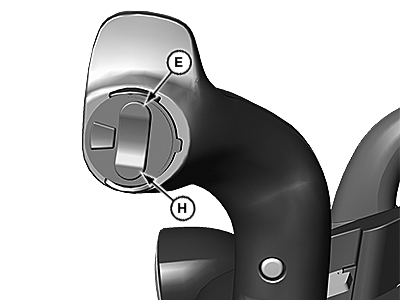
LV18031-UN-10OCT13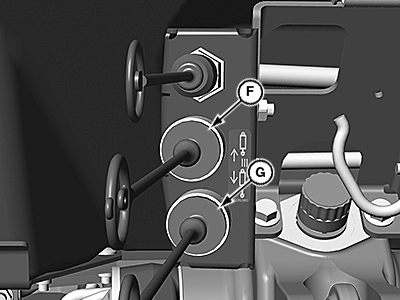
LV18032-UN-10OCT13Rear Outlet
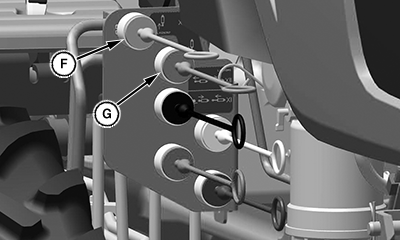
LV29108-UN-08AUG17Mid Outlet
E - 3rd SCV Control Switch
F - Upper Outlet
G - Lower Outlet
H - Bottom of SCV Control Switch
Depress the top of the 3rd (SCV) control switch (E) to allow flow from the circuit out the upper outlet (F) and return to the machine through the lower outlet (G). -
Depress the bottom of the 3rd (SCV) control switch (H) to allow flow from the circuit out the lower outlet (G) and return to the machine through the upper outlet (F).
Avoid damage! To prevent contamination of female quick couplers, color-coded hose ends should be installed in the couplers when not being used.
|
UP00731,0000305-19-20171012 |