Use Rear and Mid PTO (Operator on Seat)
Use rear mounted equipment rated for 540 rpm. Do not operate mid or rear PTO over 540 RPM mark on tachometer.
The mid-PTO is only operational with the operator on the seat.
Engaging the PTO
-
Sit on operator seat.
-
Lock the park brake.
-
Move the transmission range shift lever to the N (neutral) position.
-
The starter will not crank if the PTO switch knob is in the engaged/on position.
If the operator leaves the seat with the engine running and the mid-PTO engaged, the safety interlock system will stop the engine and all implements.
Start the engine.
-
Set engine speed to 1500 rpm or less.
-
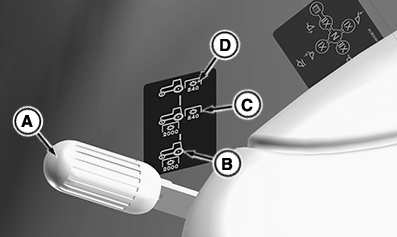
LV28522-UN-19MAY17PTO Selector OOS
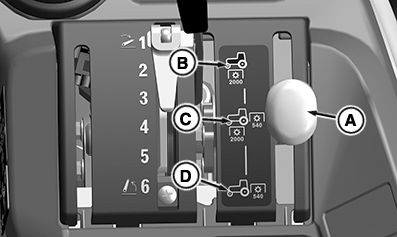
LV28523-UN-19MAY17PTO Selector Cab
Move the PTO selector lever (A) to desired operating position.- Selector Lever (A)
- Position (B) - Mid PTO only.
- Position (C) - Mid and Rear PTO both.
- Position (D) - Rear PTO only.
-
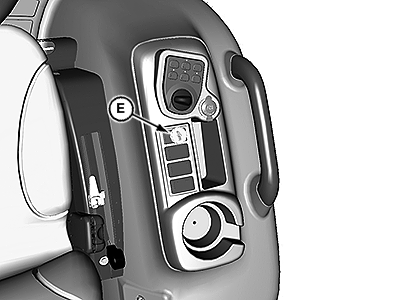
LV17557-UN-30MAY13Open Operator Station
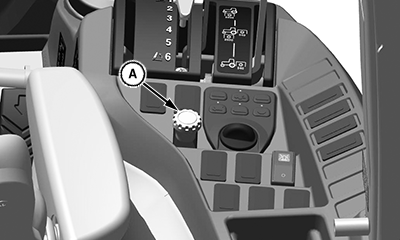
LV28706-UN-15JUN17Cab
E - PTO Switch Knob
Pull the PTO switch knob (E) up to the engaged/on position. -
- The instrument panel PTO engaged light will illuminate when the PTO is engaged.
Adjust the engine speed hand throttle forward to the desired speed for the implement used.
Using the RIO (Reverse Implement Option) Switch
If the machine is equipped with the optional RIO function, the mid PTO can be operated with machine in reverse if the RIO function is activated. The RIO switch is only operational with the operator on the seat.
-
Sit on operator seat.
-
Pull PTO switch (E) to the RIO position.
-
Press the reverse travel pedal.
RIO function will stay enabled until tractor stops or forward motion is detected.
Disengaging the PTO
-
Adjust engine rpm to slow idle.
-
Push PTO switch knob down to the disengaged/off position.
|
DB71512,000024C-19-20170814 |