Checking Secondary Clutch Buttons
-
Park the machine safely. (See Parking Safely in the SAFETY section.)
-
Let engine cool.
-
Tip seats forward.
-
Raise and secure cargo box.
-
Remove engine access panel.
-
Remove the four cap screws (A) and belt guard (B).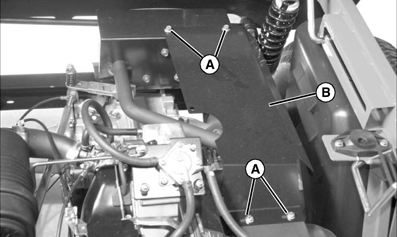
MXAL44118-UN-27MAR13 -
Check for missing or worn clutch buttons (C).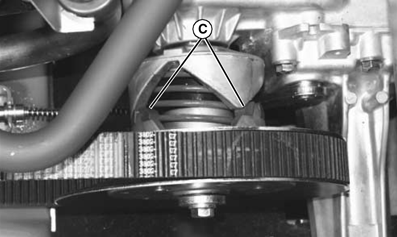
MXAL44119-UN-27MAR13- There should not be any excessive wear, or metal-to-metal contact.
- If replacement is necessary, see your John Deere dealer.
-
Install belt guard and tighten cap screws to specification.
Item Measurement Specification Cap screw Torque 14 N·m (124 lb-in.) -
Install engine access panel.
-
Lower the cargo box.
-
Tip seats back.
|
SP66632,0004350-19-20130328 |