Using Instrument Panel Arrow Keys
-
Turn key to run position.
-
Push up arrow (A) to toggle between odometer, trip meter and hourmeter.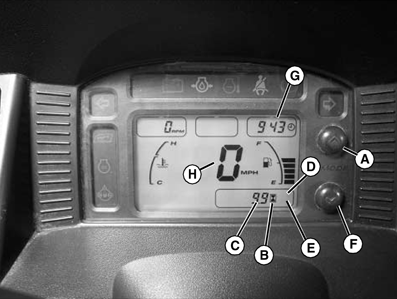
MXAL45659-UN-09APR13- When “ODO” (D) (not shown) is displayed, odometer indicator (C) will display the amount of miles or km the machine has moved. (To change between miles or km displayed, see next step.)
- When “TRIP” (E) (not shown) is displayed, the trip indicator (C) will display the amount of miles or km the machine has moved since last reset. (Press and hold the up arrow (A) for 3 seconds to change the display back to “0” for beginning a new trip.) (To change between miles or km displayed, see next step.)
- When hourmeter (B) is illuminated, the indicator (C) will display the amount of hours the engine has run.
-
Push down arrow (F) to adjust LCD display backlight illumination (brightness) to 100%, 75%, 50% & 25%.
-
Push and hold up arrow (A) and down arrow (F) for approximately 3 seconds to obtain change clock display (G) and unit set mode (H) screens.
NOTE: If you wait longer than 5 seconds before touching either the up or down arrow, the display will go back to the main screen and you will need to press and hold up and down arrows for 3 seconds again to get back to the clock display and speed screens.
- Push up arrow (A) to change from 12 or 24 hour display.
- Push down arrow (F) to obtain clock display screen that changes specific hour and minutes. Press up to increase hour setting. Push down arrow (F) again to display minutes. Push up arrow to increase minute setting. (Press and hold up arrow for approximately 2 seconds to have minute counter run continuously. Release up button to stop minute counter.)
- Push down arrow (F) to obtain speed display (H). Push up arrow (A) to change from mph to km/h. This will change the speed display (H), and also when showing the odometer and trip displays.
- Push down arrow again to exit display menu.
|
RH75544,0000183-19-20130408 |