Servicing Air Cleaner Element
-
Park the machine safely. (See Park Safely in the SAFETY section.)
-
 CAUTION: Touching hot surfaces can burn skin. The engine, components,
and fluids will be hot if the engine has been running. Allow the engine
to cool before servicing or working near the engine and components.
CAUTION: Touching hot surfaces can burn skin. The engine, components,
and fluids will be hot if the engine has been running. Allow the engine
to cool before servicing or working near the engine and components.Allow engine to cool.
-
Raise hood.
-
Clean any dirt and debris from air cleaner before removing cover.
-
Remove nut (A), slotted washer (B) and upper case (C).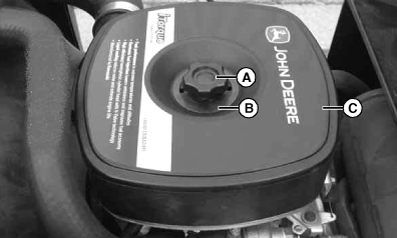
MXAL42725-UN-22MAR13 -
Inspect foam precleaner and element without removing.
-
IMPORTANT: Dirt and debris can enter the engine through a damaged filter element:
- Do not wash paper element.
- Do not attempt to clean paper element by tapping against another object.
- Do not use pressurized air to clean element.
- Replace element only if it is very dirty, damaged or the seal is cracked.
Inspect the foam precleaner without removing it. If the precleaner (C) is dirty: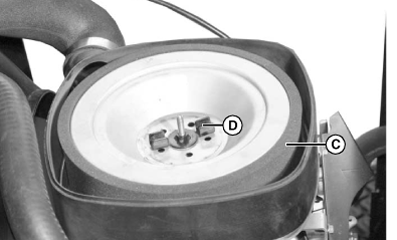
MXAL42726-UN-22MAR13- Remove it from the filter carefully, leaving the paper element in the air cleaner housing.
- Wash precleaner in a solution of warm water and liquid detergent.
- Rinse precleaner thoroughly. Squeeze out excess water in a dry cloth until precleaner is completely dry.
-
NOTE: Do not oil precleaner
Inspect the paper filter element without removing it. If the element is damaged or dirty: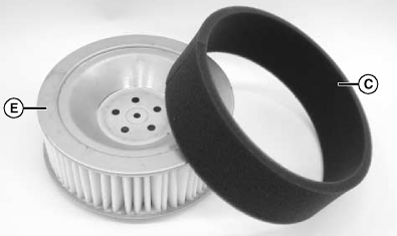
MXAL42727-UN-22MAR13- Remove wing nut (D).
- Carefully remove paper filter element (E) from air cleaner housing.
- Clean air cleaner base very carefully, preventing any dirt from falling into carburetor.
- Install new paper filter element into air cleaner. Make sure element is seated properly.
- Install and tighten wing nut.
-
Install foam precleaner (C) on paper element.
-
NOTE: When installing slotted washer, rotate so all four holes in upper case are open.
Install upper case, slotted washer and nut.
|
OUO2004,00002DB-19-20130715 |