Using Rear PTO (Optional)
Engaging PTO
-
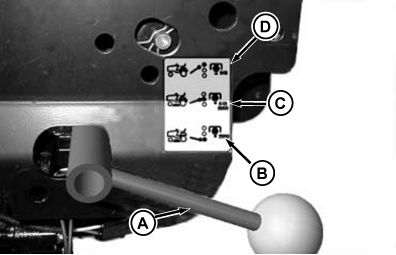
MXT015555-UN-14AUG15A - Selector Handle
B - Front/Mid PTO Position
C - Front/Mid PTO and Rear Position
D - Rear Only PTO Position
With engine off and park brake on, use the PTO selector handle (A) to choose between front/mid PTO position (B), front/mid PTO and rear PTO position (C), or rear only PTO position (D). -
Get back on the tractor.
-
Start Engine.
-
After engine has warmed move throttle lever to maximum engine speed.
-
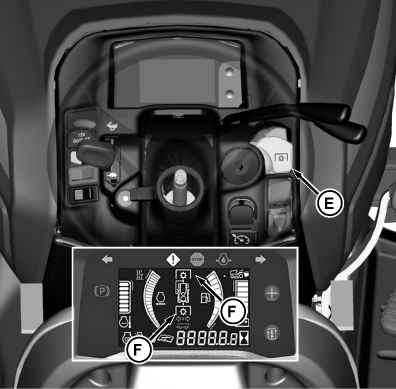
MXT015556-UN-14AUG15E - PTO/RIO Switch
F - PTO Indicator
Pull PTO/RIO switch (E) up. Instrument cluster PTO indicator (F) comes on when PTO is engaged.NOTE: With the optional front PTO kit installed (and the PTO selector handle in front/mid PTO position (lowest handle position)) the front PTO drive shaft continues to operate when the reverse travel pedal is depressed.
If PTO selection lever is in either rear or rear/mid position, depressing the reverse pedal disengages the PTO.
Disengaging Optional Rear PTO
Push PTO/RIO switch down to disengage the PTO. Instrument cluster PTO indicator goes out.
NOTE: Any PTO interlock violations cause PTO indicator to flash, as PTO is not engaged.
|
OUO2004,0000CC2-19-20150814 |