Install Grass Collector
Hopper Parts
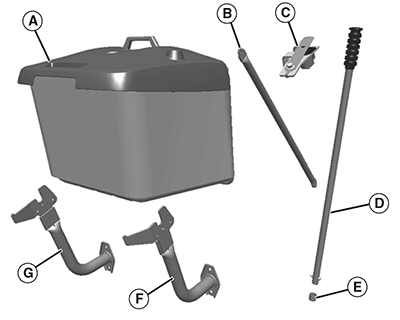
MXAL47249-UN-16APR13
|
Qty. |
Description |
|---|---|
|
1 |
Hopper Assembly (A) |
|
2 |
Tube, Support (B) |
|
1 |
Switch Assembly, Hopper Presence (C) |
|
1 |
Handle, Dump (D) |
|
1 |
Cap, Plastic (E) (In Bag of Parts) |
|
1 |
Arm, Right Hopper Support (F) |
|
1 |
Arm, Left Hopper Support (G) |
|
1 |
Sound Mat, Rubber |
Bag of Parts:
|
Qty. |
Description |
|---|---|
|
2 |
Pin, Headed, M6x30 |
|
4 |
Washer, 6.5 mm |
|
4 |
Cotter Pin |
|
1 |
Bolt, M6x35 |
|
1 |
Carriage Bolt, M6x20 |
|
2 |
Locknut, M6 |
|
3 |
Tie Strap |
Assemble Hopper
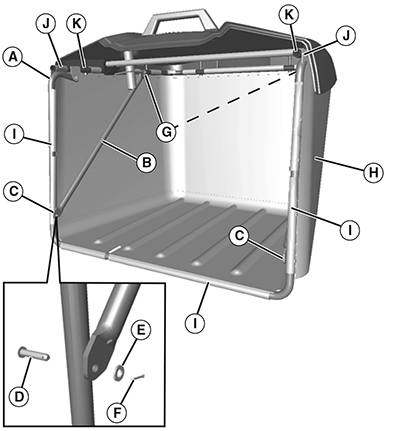
MXAL47250-UN-16APR13
-
Fold down hinged tube (A) as shown.
-
Install two support tubes (B) (one on each side), and secure bottom side (C) with two M6x30 headed pins (D), 6.5 mm washers (E), and cotter pins (F).
-
Secure support tubes on pins on upper side (G) with 6.5 mm washers (E) and cotter pins (F).
-
Rotate the hopper assembly so the bottom side is up, and unfold grass bag (H) into the open position. Snap clips (I) on grass bag to three sides of tube frame assembly.
-
Push grass bag end clips (J) onto front end of upper tube (K), and slide slightly rearward under hopper top (L).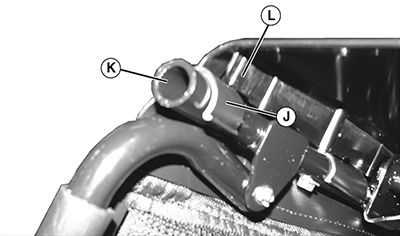
MXAL47251-UN-16APR13 -
Open grass bag zipper to obtain open pocket area; zipper is found on the lower, inner side of grass bag curtain (M). Insert rubber sound mat into open pocket, so the letter “B” on sound mat will be visible on the inside bottom of the grass bag. Close zipper.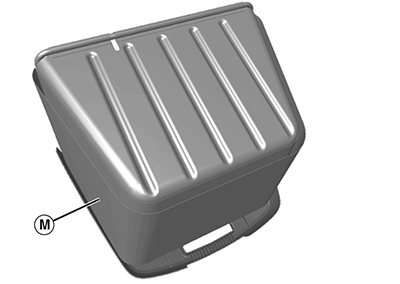
MXAL47252-UN-16APR13 -
Rotate hopper assembly to the upright position, and install dump handle (N) into hopper assembly. Install a M6x35 bolt (O) and M6 locknut on end of dump handle. Install plastic cap (P) onto end of handle.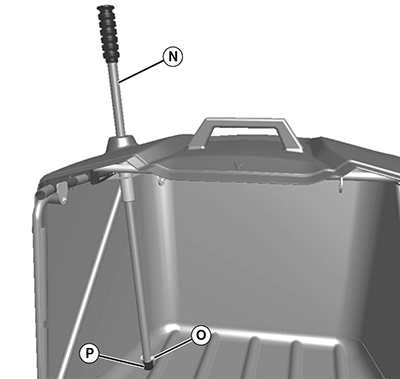
MXAL47253-UN-16APR13
Install Hopper
NOTE: Left support arm is slightly different than right support arm. Install arms so top rear surfaces curve inward.
MXAL47254-UN-16APR13
-
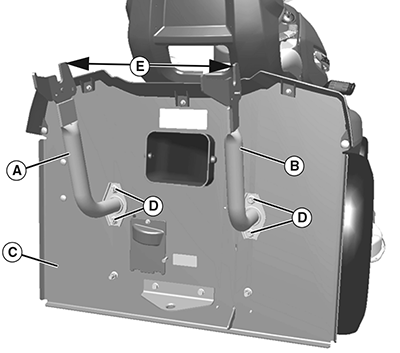
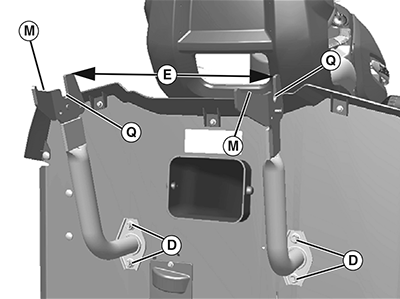
Install left (A) and right (B) hopper support arms onto back plate (C), using hardware (D) already on machine. Note differences in left and right arms. Snug hardware enough to allow later adjustments to the arms.
-
For initial adjustment, rotate the arms so the outer top surfaces are a specified distance (E) apart.
Item Measurement Specification Arms-to-Outer top surfaces Distance 395 mm (15-35/64 in.) -
Install hopper presence switch assembly (F) to left hopper support arm (B), as shown, using one M6x20 carriage bolt and M6 locknut (G).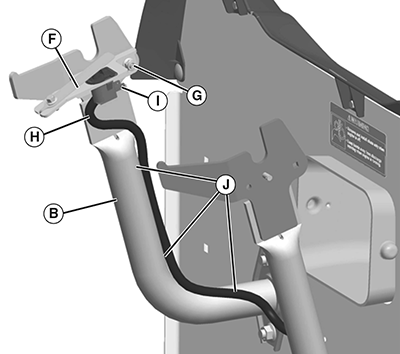
MXAL47255-UN-16APR13 -
Route electrical harness (H) up the hopper support, as shown, and plug into switch (I). Secure the harness at three points (J) using three tie straps.
-
Use two handles (K) to raise hopper assembly (L) onto back portion (M) of support arms, and leave hopper assembly open at an approximate 20° angle (N).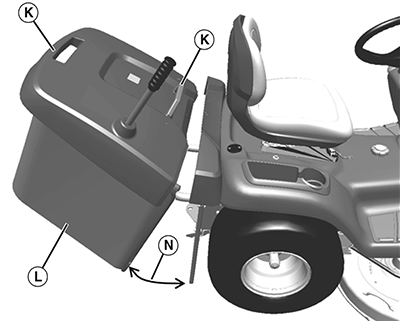
MXAL47256-UN-16APR13 -
IMPORTANT: Make sure arrows are aligned before closing hopper assembly. Damage could occur to machine and/or hopper if arrows are not aligned.
MXAL47257-UN-16APR13
With hopper still at an approximate 20° angle, inspect that the center arrow (O) on the hopper aligns to the center arrow (P) on the machine. Move hopper, as necessary, to align the arrows.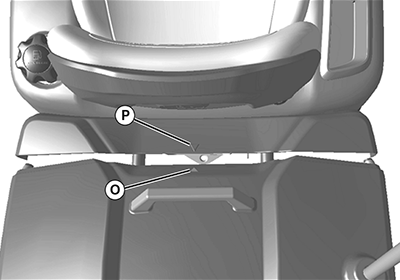
MXAL47258-UN-16APR13 -
Push the hopper forward, causing it to fall into the pivot (Q) on the support arms. Check again to be sure arrows align.
-
If arrows do not align, remove the hopper and rotate the support
arms, if necessary, to align the arrows and maintaining the 395 mm
(15-35/64 in.) dimension (E). Tighten the support arm hardware (D)
to specification. Install hopper back onto top of support arms at
an approximate 20° angle, push hopper forward into the pivot on
support arms, and make sure arrows align. Repeat adjustment procedure,
if necessary.
Item Measurement Specification Support Arm Hardware Torque 65 N·m (48 lb-ft)
-
If arrows do not align, remove the hopper and rotate the support
arms, if necessary, to align the arrows and maintaining the 395 mm
(15-35/64 in.) dimension (E). Tighten the support arm hardware (D)
to specification. Install hopper back onto top of support arms at
an approximate 20° angle, push hopper forward into the pivot on
support arms, and make sure arrows align. Repeat adjustment procedure,
if necessary.
-
Close hopper assembly.
-
Open and close hopper to check movement. Verify that hopper cannot be removed from machine when it is in the open position. Adjust as necessary.
-
Verify PTO operates with hopper installed and does not operate with the hopper off. With hopper off, hopper fill dash light should illuminate.
|
MX00654,000006E-19-20130817 |