Adjusting Seat (Standard)
Adjusting Seat Position With The Slide Adjustment Lever (All Models)
-
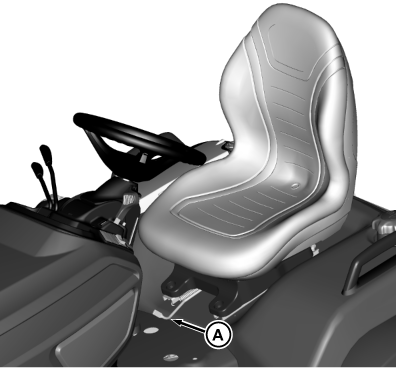
MXT010938-UN-11JUN14X750 model shown
Move seat adjustment lever (A) to the left. -
Slide seat forward or backward to desired position.
-
Release lever.
-
Check to be sure seat is locked in position.
Changing Slide Rail Position (All Models)
The slide rails can be secured to the fenderdeck in two different sets of mounting holes. This provides an additional front / rear adustment to extend the range of the basic slide adjustment.
-
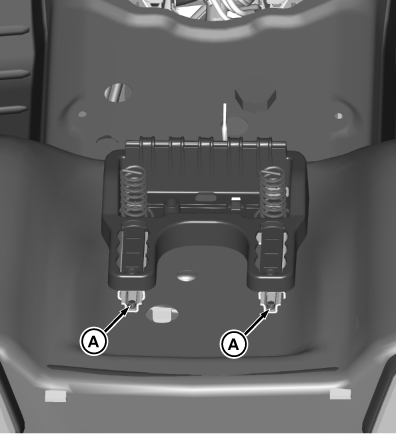
MXT010924-UN-04JUN14X750 model shown
Remove and retain two bolts (A) at rear of slide rails. -
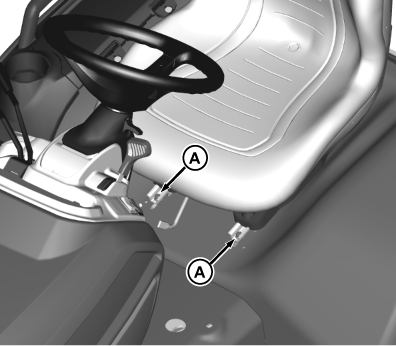
MXT010939-UN-11JUN14X750 model shown
Loosen two bolts (A) at front of slide rails. -
Slide to front or back as desired.
-
Install two bolts, removed earlier, at rear of slide rails, then tighten all hardware.
Adjusting Seat Height and Suspension
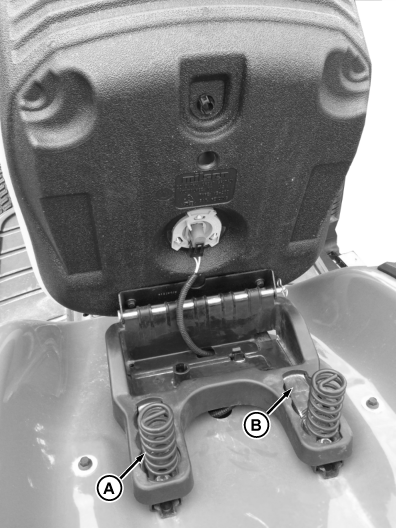
MXT010940-UN-11JUN14
- Move springs (A) to front position for softest ride.
- Move springs (A) to middle position for average ride.
-
Move springs (A) to rear position for firm ride.
NOTE: Additional suspension springs can be installed for extra
support. See your John Deere dealer.
|
OUO2004,00009A4-19-20140612 |