Install Rotation Handle Bracket
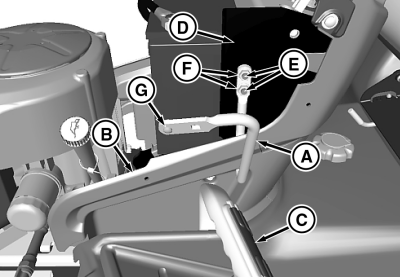
MXT007271-UN-29MAY13
Picture Note: 44 in. Model with mechanical lift shown.
A - Rotation Handle Bracket
B - Console Panel
C - Lift Pedal (44 in. Model with Mechanical Lift Only)
D - Console Support Plate
E - Carriage Bolt, M8 x 20
F - Nut, M8
G - Screw, Pan Head, M5
-
Raise hood.
-
Insert straight end of rotation handle bracket (A) through an existing access hole in the left console panel (B).
-
Align the two mounting holes in the straight end of the bracket with two square mounting holes in the left side console support plate (D). Install bracket by inserting two M8 x 20 carriage bolts (E) through the console support plate and the bracket, and securing with two M8 nuts (F). Tighten hardware.
-
Install M5 pan head screw (G), from the outside, into the round hole at the end of the bracket, and secure at the inside with an M5 nut. Tighten hardware.
NOTE: The screw head will serve as a locating pin for the chute and spout bracket.
-
Close hood.
|
TH84124,0000160-19-20130529 |