Using the Battery Charger
 Avoid injury! To avoid electric shock, do not perform
these tests unless properly trained in electrical systems. If you
have any doubt about the ability to perform these tests call a licensed
electrician.
Avoid injury! To avoid electric shock, do not perform
these tests unless properly trained in electrical systems. If you
have any doubt about the ability to perform these tests call a licensed
electrician.
When the charger is plugged into the AC outlet, the light switch and accessories circuits still remain live but key switch is not active when connected to the batteries and the charger.
When machine surrounding temperature reaches and goes above 50° C (122° F), charger will shut off.
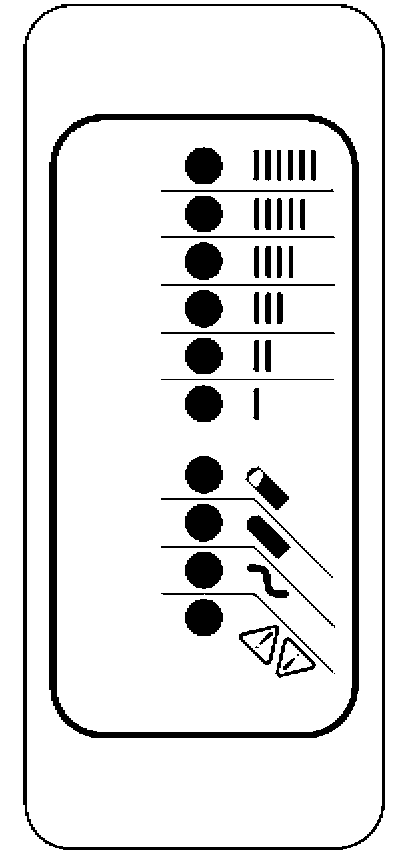
Diagnostics Using the Battery Charger 10-LED Indicator Display
|
LED Indications After The “Power-On Self Test” |
||||
|
|
Ammeter (Amber) |
|
Solid: |
Displays approximate scale of current output during bulk phase. |
|
Also indicates algorithm #1-6 for 11 seconds if no battery is connected. |
||||
|
Flashing: |
High internal charger temperature. Current output reduced.
|
|||
|
80% Charge (Amber) |
|
Solid: |
Bulk charge phase complete, 80% charged. In Absorption phase. |
|
|
Flashing: |
With no battery connected, indicates algorithm # selected by number of flashes. |
|||
|
100% Charge (Green) |
|
Solid: |
Charging complete. Charger in Maintenance Mode. |
|
|
Flashing: |
Absorption phase complete. In Finish phase. |
|||
|
AC On (Amber) |
|
Solid: |
AC Power good. |
|
|
Flashing: |
Low AC Voltage, check voltage and extension cord length (max 100’, 12-AWG or 50’ 14-AWG). |
|||
|
Fault (Red) |
|
Flashing: |
Charger error. Check code and refer to troubleshooting guide below. |
|
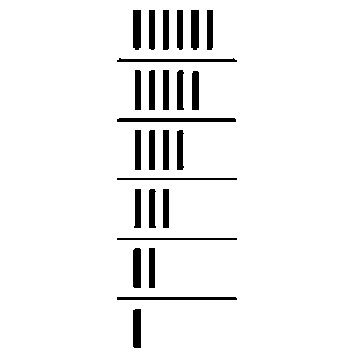




Fault Indications on Charge Plate Gauge or Battery Charger Gauge
|
Fault LED Flashes (Red) |
Explanation and Solution |
|
|
|
High Battery Voltage Detected |
|
|
Check that the battery charger voltage is consistent with the battery pack voltage. The first two digits of the four digit model name indicate the battery voltage the charger supports.
|
||
|
|
Low Battery Voltage Detected |
|
|
Check the battery and connections to the battery.
|
||
|
|
Charge Timeout - Indicates the battery failed to charge within the allowable time. This could occur if the battery is of larger capacity than the algorithm is intended for. In unusual cases it could mean charger output is reduced due to high ambient temperature. It can also occur if the battery is damaged, old, or in poor condition. |
|
|
Check the battery for damage such as shorted cells and insufficient water. Try the charger on a good battery.
|
||
|
|
Check Battery - This fault indicates the battery pack could not be trickle charged up to the minimum level required for the normal charge cycle to be started. |
|
|
Check that none of the battery pack connections between modules are reversed or incorrectly connected. Check that one or more cells in the battery are not shorted. Confirm that the nominal battery pack voltage is the same as the battery charger voltage. Try the charger on a good battery.
|
||
|
|
Over-Temperature: This fault indicates the charger has become too hot during operation. This extra fault indication (as opposed to the flashing ammeter described above), indicates an even higher temperature was reached inside the charger. Though not damaging to the charger, charge time will be extended significantly. |
|
|
This fault indication will not clear automatically, but the charger will restart charging automatically when the temperature drops. The fault indication must be cleared manually by unplugging the AC power, waiting 30 seconds and reconnecting the AC.
Confirm that dirt or mud is not blocking the cooling fins of the charger. If required, clean the charger by rinsing it with a low pressure hose. Do not use high pressure. Do not use a pressure washer. |
||
|
|
QuiQ Internal Fault: This fault indicates that the batteries will not accept charge current, or an internal fault has been detected in the charger. This fault will nearly always be set within the first 30 seconds of operation. If it occurs after the charger has started charging normally, be sure to make a note of it. |
|
|
Try to clear the fault by unplugging AC power, waiting 30 seconds and reconnecting the AC.
The most likely reason for this fault is a fault in the battery such as a bad battery connection, an open cell, or insufficient water. This fault will occur if an internal fuse inside the charger blows. If the green wire is shorted to ground even momentarily this fuse will blow. To check the fuse, measure with an ohmmeter between the green and red wires with the AC disconnected. If a short circuit is not measured, the fuse has blown. Return unit to a service depot to have this fuse replaced. If this fault occurs after battery charging has started, confirm that AC power was not interrupted and that all battery connections are good. If all battery connections are good, an internal fault has been detected and the charger must be brought to a qualified service depot. |
||






Other Indications
|
Indication |
Explanation and Solution |
|
|
AC On LED Lit, Charger won’t start charging |
Charger has detected a condition that does not allow it to charge |
|
|
Confirm battery connections are good.
|
||
|
Excessive Battery Watering or Strong Sulphur (Rotten Egg) Smell |
Overcharging or high battery temperature |
|
|
Confirm that the battery pack is not too small – usually > 50Ah.
|
||
|
OUMX068,000047D-19-20131210 |