Using the LCD Charge Meter and the Hour Meter
Key switch must be turned to the ON “1” position to activate the charge meter LCD display.
MXAL47764-UN-12APR13
Charge Meter
The charge meter will continuously monitor the battery charge while the drive/service switch is in the drive mode.
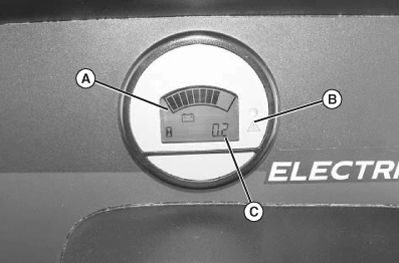
The charge meter (A) has a 10-segment bar graph LCD that displays the battery state of charge.
- All segments of the bar graph are turned ON when the battery is full. The number of segments turned ON is reduced to indicate a reduced state-of-charge.
- The next-to-last segment will flash when the battery is 70% discharged to indicate that the battery charge is getting low and should soon be recharged.
Continual discharge of the battery bank beyond the 80% discharge level will significantly reduce the cycle life of the batteries.
- The next-to-last segment and the last segment will alternately flash when the battery is 80% discharged. The red LED (B ) will also turn ON at this point to get the operator's immediate attention. The vehicle should not be operated with the batteries at this level except to return it to a location where it can be recharged.
Hour Meter
- The hour meter (C) shows the number of hours the vehicle has run.
- The service interval chart gives necessary service intervals. Use the hour meter and the service interval chart to determine when the vehicle will need service. (See SERVICE INTERVALS Section.)
|
OUO1023,0000976-19-20130417 |