Tighten Battery Terminal Connections
-
Park the vehicle safely. (See Parking Safely in the SAFETY section.)
-
Turn key switch to the OFF “0” position.
-
Press the directional control switch into the neutral “N” position.
-
Lock park brake.
-
Turn off all vehicle electrical accessories.
Move service/drive switch to the SERVICE position. (See Using the Service/Drive Switch in the OPERATING Section.)
-
 Help prevent serious injury or death from an electrical
shock or electrocution. This utility vehicle is equipped with a 48
volt electrical system which is capable of passing a high voltage
electrical current. Always use extreme caution when servicing the
battery set in this vehicle.
Help prevent serious injury or death from an electrical
shock or electrocution. This utility vehicle is equipped with a 48
volt electrical system which is capable of passing a high voltage
electrical current. Always use extreme caution when servicing the
battery set in this vehicle.Use extreme caution when using tools, wires or metal objects near batteries. A short circuit and/or spark could cause an explosion. Wrap tools with vinyl tape to prevent shorting out batteries.
Remove all jewelry (watches, rings, bracelets, etc.) before servicing the electrical system or batteries.
Lift and secure cargo box in the raised position.
-
Clean battery compartment, terminal connections, cable ends and battery(s) if necessary.
-
Pull the boots (A) on the terminal cables back far enough to expose each terminal connection.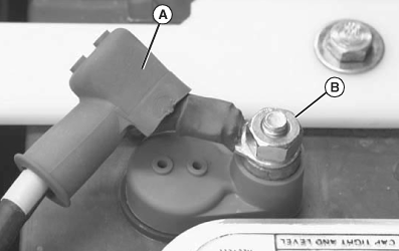
MXAL47815-UN-12APR13 -
Use insulated tools to tighten each terminal connection hex nut (B) to specifications.
Battery Terminal Hex Nuts Torque 14 - 16 N·m (124 - 142 lb-in.) -
Install the proper terminal boots (red on positive and black on negative) securely over each battery terminal.
-
Lower cargo box.
-
Move the service/drive switch to the DRIVE position.
|
OUO1023,0000991-19-20130418 |