Checking TOUCHSET Depth Control Operations-John Deere 8000/9000/8020/9020 Series Tractors
IMPORTANT: If set-up panel does not display P at start-up, then either TOUCHSET wiring connector is improperly attached or hoses are reversed at couplers. These conditions must be corrected for proper operation. 1. Open transport lock-up valve (A).
|
|
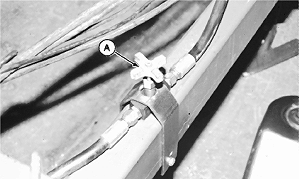
NX,980W98,A9B -19-09APR98-1/2 |
|
NOTE: (See OPERATING TOUCHSET DEPTH CONTROL-JOHN DEERE 8000/9000 SERIES TRACTORS in Operating Machine section.) 2. Place tractor transmission in PARK and/or set brakes. Start engine. If using open SCV for by-pass line, place SCV III lever (B) in FLOAT position. NOTE: Wheels will not lift off ground with TOUCHSET Depth Control. 3. Move SCV I lever (A) fully forward and then back until machine responds. 4. Push SCV I lever forward to desired operating depth. 5. Push lower position set switch (D) to set operating depth. Machine will lower to same working depth each time lever is pushed forward to detent and released. 6. Pull SCV I lever back to raise machine to desired height. Push raise position set switch (C) to set upper limit. Machine will raise to same height each time lever is pulled back to detent and released. NOTE: Symbols (F) show upper and lower settings. 7. Adjust flow rate knob (E) to determine speed at which machine will raise and lower. If machine goes beyond depth settings, flow rate is too high. See your John Deere dealer if machine does not operate as described. |
|
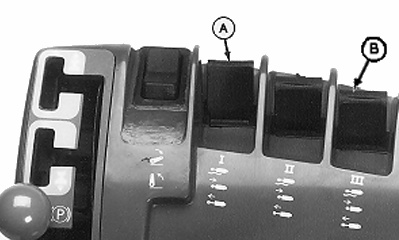
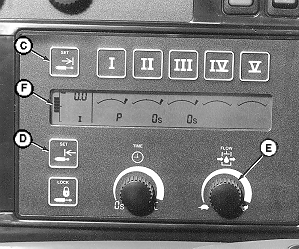
NX,980W98,A9B -19-09APR98-2/2 |