Cassette Player
|
|
|
|
|
|
Your tape player is built to work best with tapes that are 30 to 90 minutes in length. Longer tapes may be so thin that whey will not work well in this player. Do not use cassettes that are in bad condition, damaged, dirty, or have been exposed to extreme heat or sunlight. Use of poor quality, damaged or dirty tapes could cause your tape player to fail. Cassette tapes wear out. When they are worn, sound quality is reduced. Always make sure that your tapes are in good condition before you play them. Metal tape sensing and equalization is automatic. An "M" icon will appear on the display when a metal tape is sensed. Your tape player should be cleaned every time it has been used for 35 hours. If it is not cleaned regularly, sound quality may deteriorate and your tapes or tape player could be damaged. (See Cleaning Your Cassette Player for cleaning information). Playing a Cassette: 1.
Turn receiver on.
|
3.
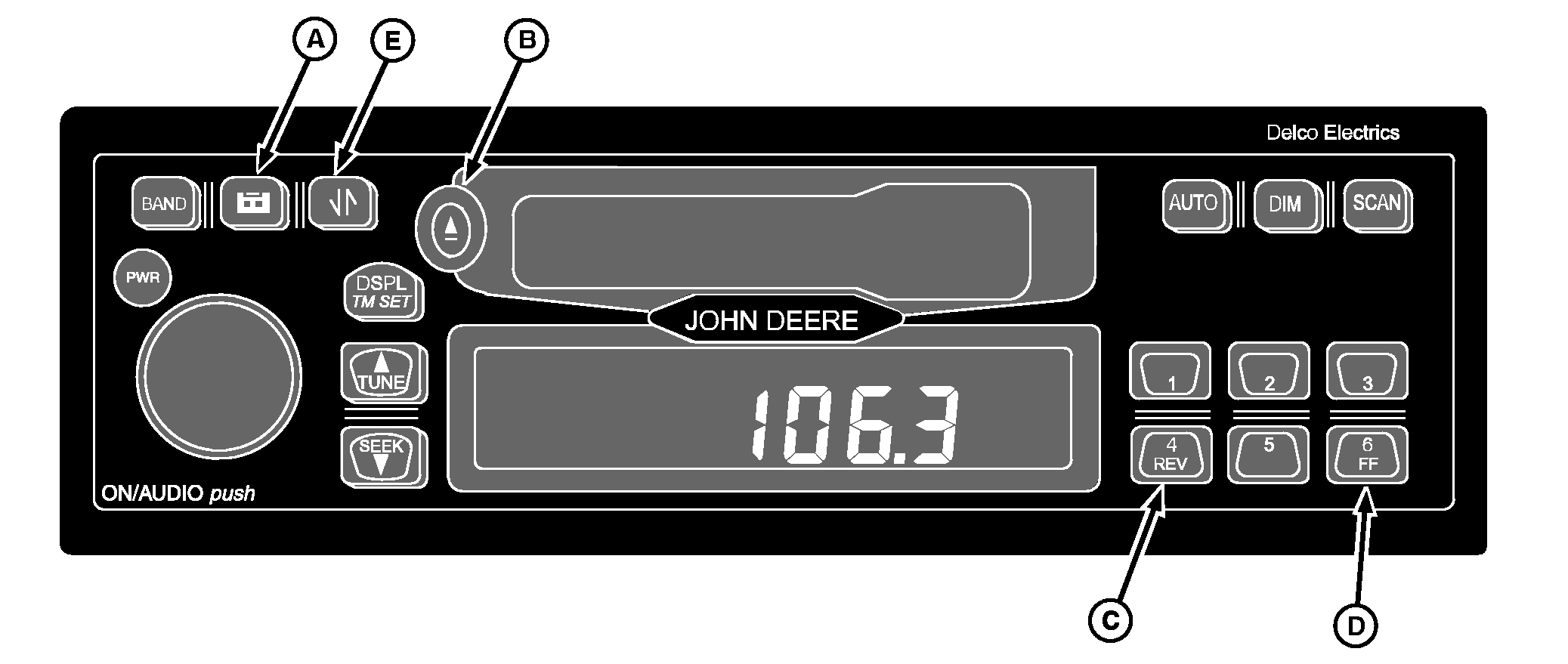
If you are listening to radio, press tape button (A) to play cassette. If no tape is loaded into player, display will show "NO TAPE". If a tape is in player, "TP SIDE1" or "TP SIDE2" will be displayed.
A tape may be inserted when receiver is off by pressing eject (B) and inserting tape within 25 seconds. Button Functions: 4/REV (C): Rewind. Tape will continue to rewind until rewind is stopped or end of tape is reached. Display will show "". Eject (B): Press to eject your tape from tape player. When Eject is held, it acts as a stop button. Tape Reverse (E): Press this button to cause tape to reverse directions and play opposite side of tape. Pressing button again will cause tape to reverse to first side again. The tape will automatically reverse when the end of the tape is reached. |
AG,OUO1035,723 -19-21JUN99-1/3 |
|
Bad Tape Detect: If receiver detects a bad cassette, "BAD TAPE" will appear on the display, and tape will be ejected. Tape may be damaged or too tight. If it is damaged, try a new tape. If tape is too tight, player cannot turn tape hubs. Remove tape and hold it with open end down. Try to turn right hub counterclockwise with a pencil. Turn tape over and repeat. If hubs do not turn easily, your tape may be damaged and should not be used in player. If you want to use a CD adapter or a cleaning cassette, bad tape detector must be turned off. To turn bad tape detector off: 1.
Turn ignition on and receiver off.
Cleaning Your Cassette Player: After 35 hours of cassette play, display will read "TP CLEAN" for five seconds indicating that it is time to clean cassette player. 1.
Turn ignition on and receiver off.
|
tape Eject button is released before "CLN RST" is displayed, clean tape timer will NOT be reset to zero.
Operating Tips About Your Audio System: Hearing damage from loud noise is almost undetectable until it is too late. Your hearing can adapt to high volumes of sound. Sound that seems normal can be loud and harmful to your hearing. Take precautions by adjusting the volume control on your receiver to a safe sound level before your hearing adapts to it. To help avoid hearing loss:
Understanding Radio Reception: FM STEREO: FM stereo will give you best sound, but FM signals will reach only about 16-65 km (10-40 miles). Tall buildings or hills can interfere with FM signals, causing sound to come and go. AM: Range for most AM stations is greater than for FM, especially at night. Longer range, however, can cause stations to interfere with each other. AM can pick up noise from things like storms and power lines. Try reducing treble to reduce this noise if you experience it. Care of Your Cassette Player Always avoid:
|
AG,OUO1035,723 -19-21JUN99-2/3 |
|
IMPORTANT: Before you add any sound equipment to your machine like a CB radio, mobile telephone or two-way radio, be sure you can add what you want. If you can, it's very important to do it properly. Added sound equipment may interfere with the operation of your vehicle's engine, radio or other systems, and even |
damage them. Your vehicle's systems may interfere with the operation of sound equipment that has been added improperly. Before adding sound equipment, check with your dealer and be sure to check Federal Regulations covering mobile radio and telephone units. |
AG,OUO1035,723 -19-21JUN99-3/3 |