Performance Channels-1 and 2Channel 1-"Gain" ParameterChannel 1 allows adjustment of "gain" parameter of ROW-TRAK ™ system. This parameter affects the rate at which machine responds to movement by probe and how long it takes to again center machine on row. Recommended setting for "gain" is "51." This is also factory preset setting.
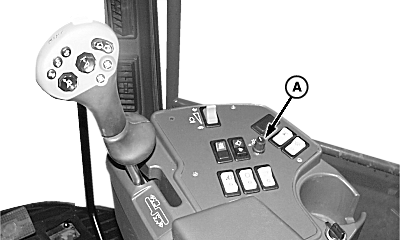
IMPORTANT: Even a small deviation from this "gain" parameter number can cause ROW-TRAK ™ system to become unstable. If "gain" is set too high, system will be over-responsive. Machine will over-shoot row or become "jerky". If "gain" is set too low, system response will be slower and cause machine to "wander" off row. Typical operating "gain" range is 50 to 60. To adjust "gain" parameter: Enter calibration mode. Enter Channel 1. Rotate "Offset" knob (A) to select a new value between 50 and 60. Do not adjust "gain" parameter value by more than increments of "2" at a time. After making adjustments be sure to drive machine before making any additional adjustments. Once desired setting is reached, press on lower portion of CAL/LEARN switch to store value in memory. |
|
 CAUTION:
Unit brush and auger assemblies rotate at a high rate of speed and can cause serious injury or death to you or others. Keep hands, feet, and clothing away from units to avoid entanglement.
CAUTION:
Unit brush and auger assemblies rotate at a high rate of speed and can cause serious injury or death to you or others. Keep hands, feet, and clothing away from units to avoid entanglement.
|
ROW-TRAK is a trademark of Deere & Company. | NXC8M745555,T11 -19-17FEB98-1/4 |
|
LOOK/LISTEN: Alarm horn will "beep" twice and tachometer will display a "00". This confirms that a new gain value has been successfully stored. Exit calibration mode by turning OFF ROW-TRAK ™ switch. To change channels, push CAL/LEARN switch in CAL position (push down on upper half of switch) and rotate "Offset" knob to change channels as desired, then release CAL/LEARN switch. |
|
ROW-TRAK is a trademark of Deere & Company. | NXC8M745555,T11 -19-17FEB98-2/4 |
|
Channel 2-"Ratio" Parameter
Channel 2 allows adjustment of "ratio" parameter of ROW-TRAK ™ system. This parameter affects the angle which guide wheels are turned for a given error. Recommended setting for "ratio" is "9". This is also factory preset setting.
IMPORTANT: Even a small deviation from this "ratio" parameter number can cause ROW-TRAK ™ system to become unstable. If "ratio" is set too high, rear of machine will "jerk back and forth" and rear wheels "over-steer". If "ratio" is set too low wheels will not turn enough and machine will tend to "wander" off row. Typical operating "ratio" range is "8" to "10". To adjust "ratio" parameter: Enter calibration mode. Enter Channel 2. Rotate "OFFSET" knob (A) to select a new value between 8 and 10. Do not adjust "ratio" parameter value by more than increments of "1" at a time. After making adjustments be sure to drive machine before making any additional adjustments. Once desired setting is reached, press on lower portion of CAL/LEARN switch to store value in memory. LOOK/LISTEN: Alarm horn will "beep" twice and tachometer will display a "00". This confirms that a new gain value has been successfully stored. |
|
|
ROW-TRAK is a trademark of Deere & Company. | NXC8M745555,T11 -19-17FEB98-3/4 |
|
Exit calibration mode by turning OFF ROW-TRAK ™ switch. To change channels, push CAL/LEARN switch into the CAL position (push down on upper half of switch) and rotate "Offset" knob to change channels as desired, then release CAL/LEARN switch. |
|
ROW-TRAK is a trademark of Deere & Company. | NXC8M745555,T11 -19-17FEB98-4/4 |