Perform ROW-TRAK™ Automatic Valve Biasing-Channel 5IMPORTANT: Valve biasing is made at factory or by dealer before machine delivery. DO NOT perform automatic valve biasing unless repair has been made to machine which requires that valve biasing be made. NOTE: If error codes are generated, see ROW-TRAK ™ Circuit Diagnostic Codes in this section. Channel 5 performs an automatic valve setup routine. This routine establishes a value in controller's memory which represents level of supply voltage at which steering valve initiates hydraulic oil flow. Value displayed on tachometer (between 0 and 255) represents required voltage value to initiate turning of guide wheels. To perform a valve bias set-up: Park machine on a firm, level surface, and turn guide tires so they are pointing straight forward. Enter Channel 5. Bring hydraulic oil up to operating temperature by running stripping units and compactor augers. Run engine at full throttle. Do not touch steering wheel during check.
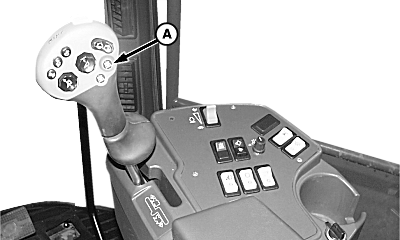
Unit brush and auger assemblies rotate at a high rate of speed and can cause serious injury or death to you or others. Keep hands, feet, and clothing away from units to avoid entanglement. Press on auto-engage button (A) to start system's auto-check. |
|
 CAUTION:
To avoid injury to you or others caused by sudden movement in rear guide wheels, stay clear of rear of machine while performing this check.
CAUTION:
To avoid injury to you or others caused by sudden movement in rear guide wheels, stay clear of rear of machine while performing this check.
|
ROW-TRAK is a trademark of Deere & Company. | NXC8M745555,T14 -19-18FEB98-1/2 |
|
There will be a short pause, then guide wheels will automatically turn, first one way, then other way. LOOK: Tachometer will display a value between 0 and 255 for left-hand side of valve and then repeat on right-hand side of valve while system is going through auto-check. LOOK/LISTEN: Alarm horn will "beep" twice and tachometer will display a "00" when auto check is finished. Exit calibration mode by turning OFF ROW-TRAK ™ switch. To change channels, push CAL/LEARN switch into CAL position (push down on upper half of switch) and rotate offset knob to change channels as desired, then release CAL/LEARN switch. NOTE: Channels 1-4 and 6-10 are for performance or diagnostic purposes only and do not have to be entered when calibrating ROW-TRAK ™ for first time operation. See Performance Channels, and Diagnostic Channels in this section for descriptive function additional of channel numbers. |
|
ROW-TRAK is a trademark of Deere & Company. | NXC8M745555,T14 -19-18FEB98-2/2 |