Diagnostic Channels-6-10Channel 6-Output DiagnosisThis channel diagnoses output half of control system. Tachometer will display a number between 0 and 255, indicating level of supply voltage being sent to each solenoid. While in this channel, turning offset dial will increase voltage to left-hand or right-hand steering solenoids, causing rear wheels to steer left or right. To check:
Enter Channel 6 then press auto-engage button. |
 CAUTION:
To avoid injury to you or others caused by sudden movement in rear guide wheels, stay clear of rear of machine while performing this check.
CAUTION:
To avoid injury to you or others caused by sudden movement in rear guide wheels, stay clear of rear of machine while performing this check.
NXC8M745555,T19 -19-18FEB98-1/4 |
|
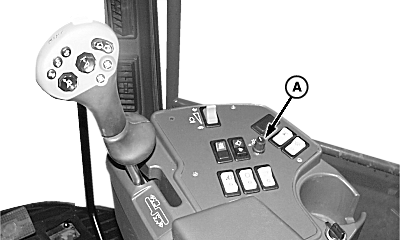
Rotate "Offset" knob (A). LOOK: When in Channel 6 mode, "Offset" knob can be used to steer machine. Clockwise rotation of knob should cause guide wheels to move in direction to make a right-hand turn. Counterclockwise rotation of knob should cause guide wheels to move in direction to make a left-hand turn. Exit calibration mode by turning OFF ROW-TRAK ™ switch. To change channels, push CAL/LEARN switch into CAL position (push down on upper half of switch) and rotate "Offset" knob to change channels as desired, then release CAL/LEARN switch. Channel 7-Crop Sensor Raw ValuesNOTE: There is no operator adjustment in this channel. This channel displays raw values of crop sensor.
With probe centered, a value between 58 and 153 MUST be indicated on tachometer for system to function correctly. If value is not within these parameters, see your John Deere dealer. Exit calibration mode by turning OFF ROW-TRAK ™ switch. To change channels, push CAL/LEARN switch into CAL position (push down on upper half of switch) and rotate "Offset" knob to change channels as desired, then release CAL/LEARN switch. Channel 8-Feedback Sensor Raw ValuesNOTE: There is no operator adjustment in this channel. This channel displays raw values of feedback (rear wheel) sensor. |
|
|
ROW-TRAK is a trademark of Deere & Company. | NXC8M745555,T19 -19-18FEB98-2/4 |
|
With guide wheels centered (straight) a value between 66 and 145 MUST be indicated on tachometer. If value is not within these parameters, see your John Deere dealer. NOTE: Best method to determine center is to measure rod exposure on each steering cylinder. Exit calibration mode by turning OFF ROW-TRAK ™ switch. To change channels, push CAL/LEARN switch into CAL position (push down on upper half of switch) and rotate "Offset" knob to change channels as desired, then release CAL/LEARN switch. Channel 9-SoftwareNOTE: There is no operator adjustment in this channel. This channel indicates the software version currently loaded in ROW-TRAK ™ controller. Exit calibration mode by turning off ROW-TRAK ™ switch, or to change channels, push CAL/LEARN switch into CAL position (push down on upper half of switch) and rotate "Offset" knob to change channels as desired, then release CAL/LEARN switch. Channel 10-"Gain" and "Ratio" ResettingThis channel allows system "gain" and "ratio" parameter settings to be reset to default settings. IMPORTANT: If Channel 10 procedures are performed, procedures in Channel 5 (Perform ROW-TRAK ™ Automatic Valve Biasing-Channel 5) and ROW-TRAK ™ learn must be performed again to reset valve values. To reset to default setting: Enter Channel 10. Press on LEARN portion of switch (lower half CAL/LEARN switch) and hold for 6 seconds. |
|
ROW-TRAK is a trademark of Deere & Company. | NXC8M745555,T19 -19-18FEB98-3/4 |
|
LOOK/LISTEN: Alarm horn will "beep" twice and tachometer will display a "00" to confirm that default values were successfully stored. Exit calibration mode by turning OFF ROW-TRAK ™ switch. To change channels, push CAL/LEARN switch into CAL position (push down on upper half of switch) and rotate "Offset" knob to change channels as desired, then release CAL/LEARN switch. |
|
ROW-TRAK is a trademark of Deere & Company. | NXC8M745555,T19 -19-18FEB98-4/4 |