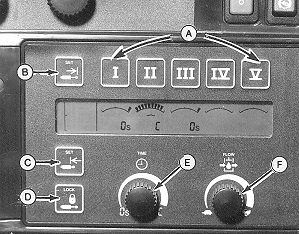
Operating TOUCHSET Depth Control-John Deere 8000/9000 and 8020/9020 Series TractorsHydraulic setup and adjustment panel on side console provides operational display of SCV function and a means to set flow rate and detent time operation for each SCV (A). At start up, display will show all SCV numbers and symbols for 2 seconds. After start up, SCV monitor display selected flow and time for each SCV. When 9-pin connector from machine is plugged into tractor, the letter "P" will be displayed on the TOUCHSET monitor for SCV I. Depth of machine is set for SCV I using cylinder retract limit touch switch (C). When SCV I control is pushed forward to detent position, machine will lower at speed selected by the flow rate knob (F) to set position. Raise height of machine is set for SCV I using cylinder extend limit touch switch (B). When SCV I control is pulled back to detent position, machine will raise at speed selected by flow rate knob (F) to set position. To raise machine past upper set limit to full transport height, or to rephase depth control hydraulic cylinders, hold SCV I control in rearward, but not into , detent position. In adjustment mode, selected SCV settings may be changed. Adjustment mode remains activated for 20 seconds after which time display returns to normal operation. In normal mode, SCV monitor will only display current flow and detent time settings for each SCV. |
|
AG,OUO1011,2685 -19-29MAR00-1/1 |