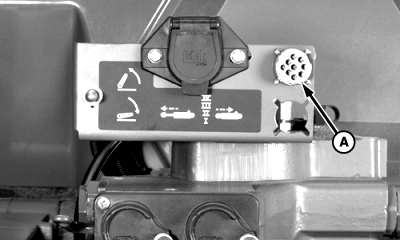
Adjusting TOUCHSET Depth Control Raise and Lower Rates and Raise Limit-John Deere 8000/9000 and 8020/9020 Series Tractors1. Make sure 9-pin connector is attached to receptacle (A). The letter "P" will be displayed on touch-set monitor for SCV I.
|
|
AG,OUO1011,2688 -19-29MAR00-1/2 |
|
2.
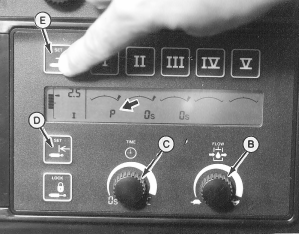
Set flow control knob (B) to rabbit or fast position. Set detent knob (C) at 3 to 6. It can be adjusted faster or slower as needed.
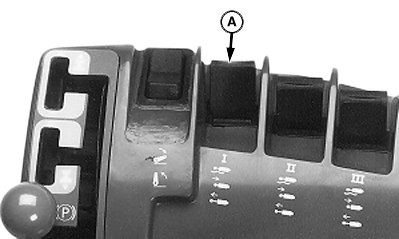
Set depth by pushing lever (A) forward to lower machine to desired working depth, and then push lower set button (D). IMPORTANT: Adjust "Drop Rate" so center frame and wings lower together and machine remains level. If set too fast, center frame sweeps will be in ground before wing sweeps. IMPORTANT: Raise limit can be set anywhere between just out of ground (so sweeps skim the surface and remove tire tracks) to full up position. Remember, the higher the machine rises, the longer it takes to lower to operating depth. Set raise limit somewhere short of full up position for efficient operation and level return to working depth. 3. To set upper raise limit, pull back on lever (A) until reaching desired upper raise position. Push upper limit button (E).
|
|
AG,OUO1011,2688 -19-29MAR00-2/2 |