Replacing Indicator, Monitor and Gauge Light Bulbs
1.
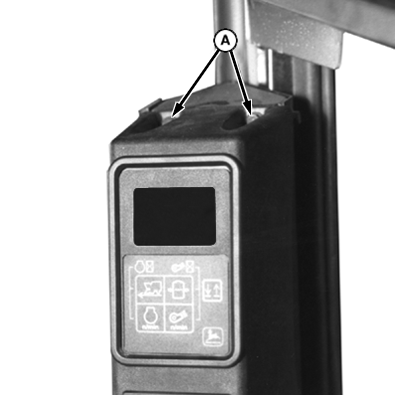
Remove four self-tapping screws (A).
2.
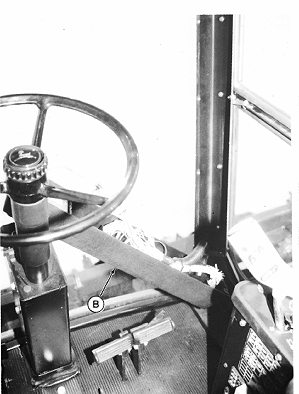
Lay corner post (B) down.
A-Self-Tapping Screws
B-Corner Post
|
|
|
|
AG,OUO1011,1192 -19-09SEP99-1/4
|
|
3.
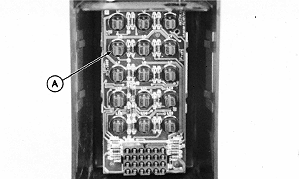
Twist indicator and monitor lights (A) 1/4-turn to remove. Replace with new bulb, AL65575.
A-Lights
|
|
|
|
AG,OUO1011,1192 -19-09SEP99-2/4
|
|
4.
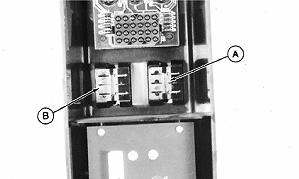
Depress retaining clips and remove STOP (A) and "!" (CAUTION) (B) lights through front side of panel.
A-Stop Light
B-Caution Light
|
|
|
|
AG,OUO1011,1192 -19-09SEP99-3/4
|
|
5.
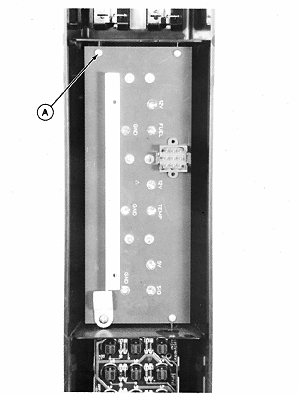
To replace gauge bulbs, remove four screws (A) and lift circuit board out of housing.
NOTE:
Same procedure is used for all three gauge light bulbs.
6.
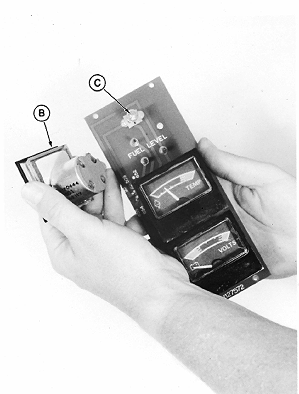
Pull out gauge (B).
7.
Remove gauge light bulb (C) by pulling from circuit board.
8.
Install new bulbs, Type 161 (AA27536), and return parts to original positions.
A-Screws (4 Used)
B-Gauge
C-Gauge Light Bulb
|
|
|
|
AG,OUO1011,1192 -19-09SEP99-4/4
|
|