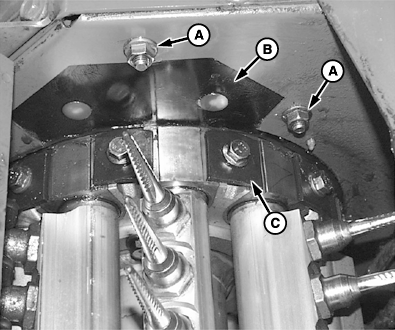
Replacing Picker Bars1. Remove M10 hardware (A) and picker bar access cover (B).2. Rotate drum manually (with a wrench on upper hex shaft of doffer) until picker bar is at opening. IMPORTANT: Picker bar damage can occur. Front and rear square spring washers MUST be reinstalled to the same drum from which they were removed. 3. Remove drum head bolts and square spring washers (C) from both sides of picker bar journal.
|
|
OUO6043,0001539 -19-25OCT01-1/3 |
|
4.
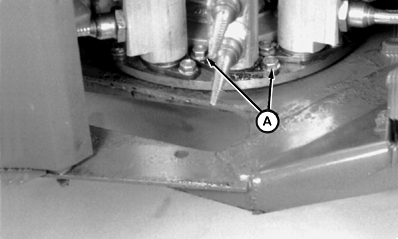
Remove two pivot stud screws (A).
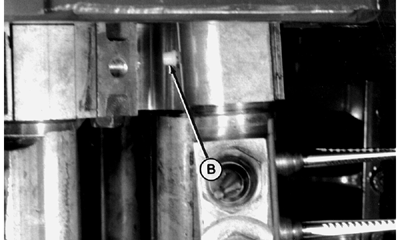
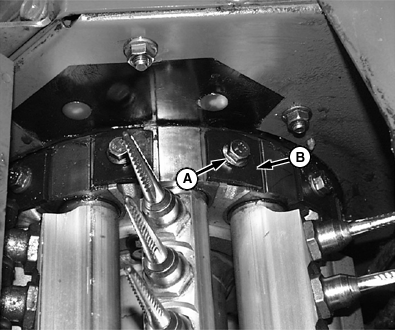
NOTE: Care must be taken so the plastic grease seal (B) is not misplaced upon picker bar removal. 5. Lift picker bar out of unit, bottom end first. IMPORTANT: Spindle drive gear damage can occur. New picker bar MUST be completely assembled and run-in by your John Deere dealer. 6. When installing picker bar assembly do the following:
Specification
|
|
OUO6043,0001539 -19-25OCT01-2/3 |
Specification
|
|
OUO6043,0001539 -19-25OCT01-3/3 |