Adjusting Doffer Zone MonitorIf you have a row unit warning on overhead display without a door plug there is either material buildup on flap or too sensitive adjustment. Remove buildup. If problem continues, reduce adjustment sensitivity. If you have no warning when you have a plug, material buildup or corrosion could prevent clip from grounding on flap, or adjustment is not set sensitive enough. Correct by cleaning with a wire brush to remove corrosion from clip. 1. Adjust flap-to-doffer clearance to specification by pushing flap all the way in before tightening mounting hardware.Specification
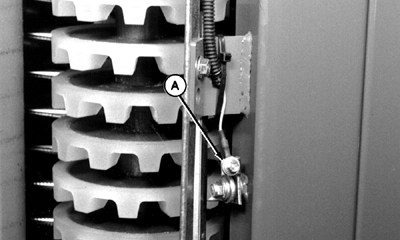
2. For material buildup problems or for less sensitive monitoring, flap can be moved away from doffer. 3. Sensitivity can also be adjusted by rotating monitor clip (A) grounding point away from flap. |
|
OUO6043,000153F -19-25OCT01-1/1 |