Diagnostic Channel-6Channel 6-Output Diagnosis This channel diagnoses the output half of the control system. The tachometer will display a number between 0 and 255, indicating the level of supply voltage being sent to each solenoid. While in this channel, turning the offset adjust knob will increase voltage to left-hand or right-hand steering solenoids, causing rear wheels to steer left or right.
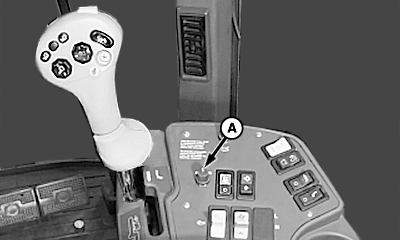
To verify voltage sent to each solenoid: 1. Enter Channel 6 then press the ROW-TRAK engage button.2. Rotate offset adjust knob (A). LOOK: When in Channel 6 mode, the offset adjust knob can be used to steer machine. Clockwise rotation of the knob should cause the guide wheels to move in the direction to make a right-hand turn. Counterclockwise rotation of the knob should cause the guide wheels to move in the direction to make a left-hand turn. Exit calibration mode by turning ROW-TRAK on/off switch to OFF position. To change channels, push the cal/learn switch into the cal position (push down on the upper half of the switch) and rotate the offset adjust knob to change channels as desired, then release the cal/learn switch. |
|
 CAUTION:
To avoid serious injury or death to you or others caused by sudden movement in rear guide wheels, stay clear of rear of machine while performing this check.
CAUTION:
To avoid serious injury or death to you or others caused by sudden movement in rear guide wheels, stay clear of rear of machine while performing this check.
NXD8M997645,T15 -19-18FEB98-1/1 |